SaaS Workflow Automation: Fix the Bottlenecks Killing Your Growth
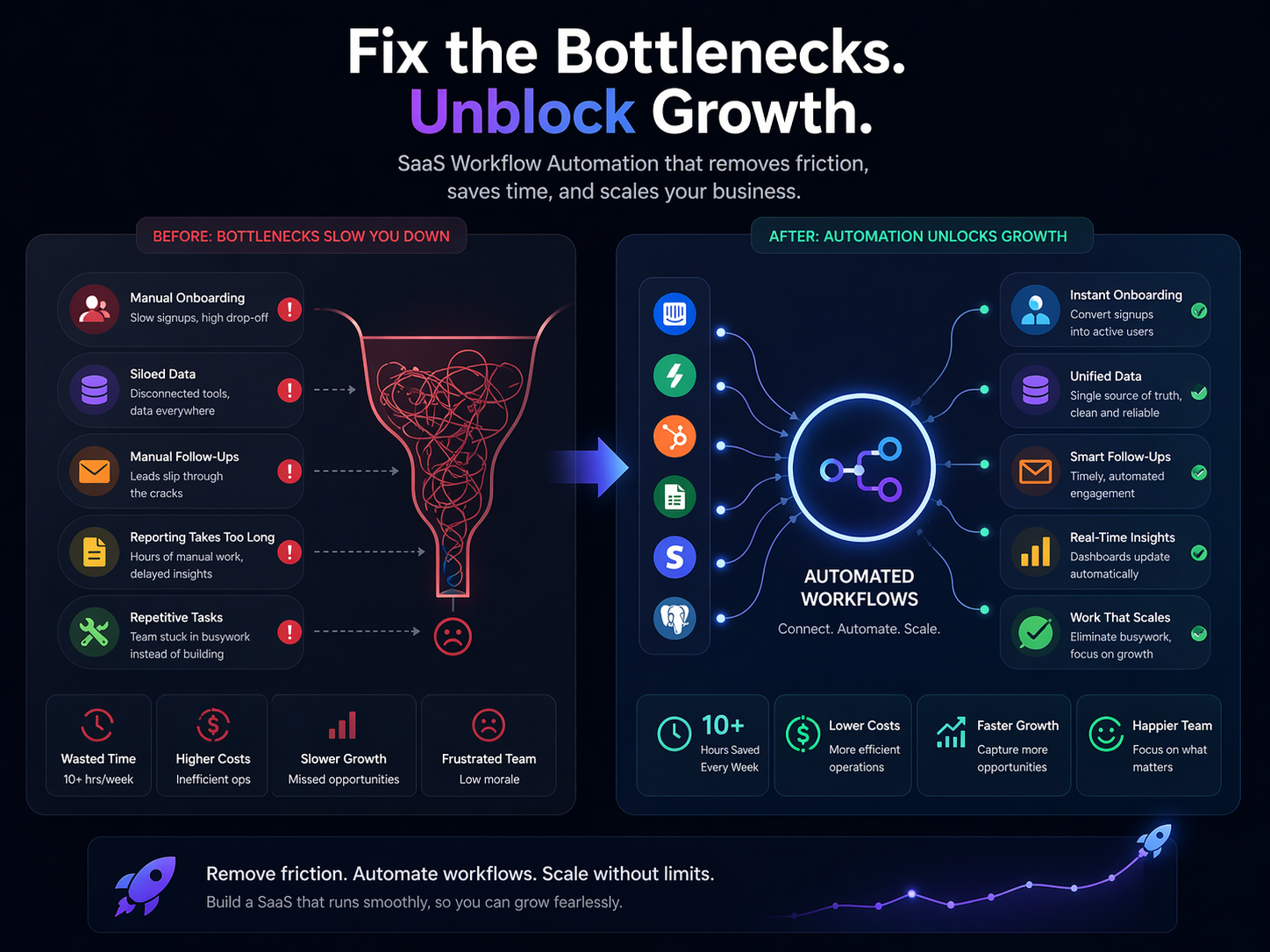
Stop losing revenue to manual handoffs and spreadsheet chaos. Discover high-ROI automation strategies for SaaS startups in 2026. Start automating at N8Nme.com
Stop Running Your SaaS on Spreadsheets and Sticky Notes
Picture a typical Tuesday at a 15-person SaaS startup: the founder is manually forwarding inbound leads to the right sales rep, the CS manager is copy-pasting health scores from a dashboard into a spreadsheet, and somewhere in a shared Google Sheet, three renewal dates have already slipped by unnoticed. This isn't a story about a disorganized team, it's the default operating mode for most growing SaaS companies, and it's quietly costing you more than you think.
The numbers make this concrete. Managers lose roughly 8 hours every week to manual, repetitive work, that's a full day of building, selling, or serving customers, gone to administrative overhead. Nearly half of RevOps teams still rely mostly or entirely on manual processes for critical revenue handoffs like lead routing, pipeline updates, and renewal tracking. And here's the part that stings in 2025: even teams that have started using AI tools are discovering a new problem, with workers spending an average of 4.5 hours per week cleaning up AI mistakes because there's no governance or QA layer in place.
Workflow automation, at its core, is straightforward: it's connecting your tools so that data flows and actions happen automatically, without a human manually triggering each step. When a lead fills out your demo form, automation enriches the record, routes it to the right rep, and sets an SLA timer, in minutes, not days. When a payment fails, a dunning sequence fires without anyone touching it. When a customer hits a risk threshold, your CS team gets an alert before the churn happens.
Your Leads Are Going Cold While You Route Them Manually
If you're a founder or early operator, you probably know the drill: a lead comes in, someone checks the form submission, tries to figure out which rep should own it, pastes details into the CRM, and maybe Slacks the rep, if they remember. By the time the lead gets a real response, it's been 48 hours. That's not a people problem. It's a process problem you can fix in a weekend.
A 2025 RevOps report found that nearly half of teams still rely mostly or entirely on manual processes for lead handling. The downstream cost is real: slower speed-to-lead, higher CAC waste, and reps spending nearly 30% of their time on data entry instead of selling.
The Before State Is Costing You Deals
Here's what manual RevOps actually looks like at a 10-50 person SaaS company:
- Lead comes in via form, cold outbound reply, or product signup
- Someone manually checks company size, industry, and ICP fit, usually in three or four browser tabs
- A Slack message or email gets sent to the right rep (or the wrong one)
- CRM gets updated hours later, if at all
- No SLA tracking, no escalation if the rep doesn't respond
The result: lead routing taking 2-3 days end-to-end. One RevOps automation case study reduced that same process to 15 minutes after automation was implemented, and cut cost per lead and sales admin time significantly in the same motion.
What You Should Actually Automate First
You don't need to boil the ocean. Four high-leverage automation targets cover most of the leakage:
Lead enrichment on inbound: Automatically pull firmographic data, company size, industry, funding stage, tech stack, the moment a form is submitted or a signup happens. Tools like Clearbit, Apollo, or Clay connect via API and populate your CRM without a human touching it.
Routing rules based on real criteria: Route by territory, segment, deal size, or round-robin using logic that lives in your workflow tool, not someone's head. If the lead is enterprise and in North America, it goes to rep A. Always. Automatically.
SLA alerts and escalation triggers: If a lead hasn't been contacted within 30 minutes, Slack the rep. If it's been two hours, notify the manager. This alone recovers a meaningful percentage of leads that would have gone cold.
Pipeline hygiene automation: Flag deals with no activity in 14 days, auto-update stage fields based on email or meeting activity, and remove stale contacts without manual audits.
With this in place, sales reps drop from spending ~30% of their time on data entry and admin to closer to 10%, time that moves directly into pipeline-generating activity.
The Stack Doesn't Have to Be Complicated
This is where founders often stall, assuming automation requires an ops hire or an expensive platform. It doesn't. n8n is an open-source workflow automation tool that connects your CRM (HubSpot, Salesforce, Attio), enrichment APIs, Slack, and email without writing custom code. You can build the full inbound routing flow described above in a few hours using its visual workflow builder.
The honest framing: if you are doing any part of this manually right now, you are paying for automation with rep time and lost deals, you just haven't seen the invoice yet. The fastest RevOps payback in most early-stage companies isn't a new tool. It's removing the human from the handoff.
Your Onboarding Checklist Is Killing Your Activation Rate
You spent months building a product that solves a real problem. A new customer signs the contract, your team sends a congratulations email at 11 PM (because that's when the Zapier workflow fires), and then... a CSM manually copies account details into three different tools on Monday morning. By Wednesday, the customer still hasn't seen their first meaningful moment of value.
This is the onboarding gap that quietly destroys retention before you ever get a chance to fight for it.
Manual onboarding creates compounding failure modes. Welcome emails arrive out of context. Setup tasks depend on a CSM remembering to send a follow-up. Permissions get misconfigured. Stakeholder invites never go out. Every customer gets a slightly different experience depending on who handled their account that week. The result isn't just friction, it's a trust deficit that starts accumulating on day one.
The data makes the cost of this painfully clear: personalized, automated onboarding flows deliver roughly 65% higher completion rates than generic, one-size-fits-all sequences. And onboarding completion isn't a vanity metric, it's one of the strongest leading indicators of 90-day retention and long-term expansion revenue. Customers who reach their first value milestone in the first week are dramatically more likely to renew and expand than those who don't.
From Manual Checklist to Automated Activation Journey
The shift isn't about removing the human touch from onboarding, it's about removing the *manual labor* so your CSMs can focus on the conversations that actually require judgment. Here's what that looks like in practice:
What to automate in your onboarding flow:
- Provisioning triggers, The moment a deal closes in your CRM, automatically create the account, configure default settings, and send workspace credentials. No waiting for someone to log in Monday morning.
- Time-aware welcome sequences, Deliver onboarding emails based on *user behavior*, not a fixed drip schedule. If someone hasn't logged in after 48 hours, send a re-engagement nudge. If they completed setup in day one, skip the basics and accelerate toward advanced features.
- In-app task triggers, Surface the next setup step contextually, based on what the user has and hasn't completed. A customer who connected their first integration should see a prompt to invite a teammate, not a tutorial they already passed.
- Stakeholder invite automation, Identify the right moment (typically after the admin completes core setup) to prompt an invite workflow, rather than relying on a CSM to remember a follow-up email.
- First-value milestone detection, Define what "activated" looks like in your product (first report run, first campaign sent, first integration live) and trigger a congratulations sequence plus a CSM alert when it happens.
The practical orchestration layer here doesn't need to be complex. Tools like n8n let you connect your product database, CRM, email platform, and Slack into a single onboarding workflow, so when a new account is created, data flows automatically to HubSpot, a personalized sequence fires in your email tool, and your CSM gets a Slack notification with account context, all without a single manual step.
The before/after here is stark. Before automation: a CSM spends 45 minutes per new account doing data entry and setup tasks, and customers wait 2-3 days for their environment to be ready. After automation: provisioning completes in minutes, the right message reaches the right user at the right time, and your CSM's first touchpoint is a strategic check-in call, not a status update on whether credentials were sent.
Onboarding isn't a welcome email. It's the first proof point that your product delivers on its promise. Automate the mechanics, and your team can finally focus on making that proof point land.
Churn Is Preventable, If You Catch It Before Your CSM Does
Here's the painful irony most SaaS founders eventually confront: your churned accounts usually gave you every signal you needed, weeks before they submitted the cancellation. Login frequency dropped. Key features went untouched. Support tickets went unanswered. But your CS team was buried in CRM updates, manual health score refreshes, and QBR prep. Nobody connected the dots in time.
This isn't a people problem. It's a systems problem.
The average CS manager at a scaling SaaS startup is doing work that should be automated: copying product usage data into spreadsheets, manually updating health scores, writing the same "checking in" email for the fifth time this week. AI-driven CS automation can save teams 10+ hours per week just by eliminating that manual data work and surfacing churn signals automatically. Launch Potato recaptured 25% of CSM time by automating routine tasks, time that went back into actual relationship-building and strategic account work.
Early Warning → Automated Play → Measurement Loop
The teams winning at churn prevention treat it like incident response: detect the signal, trigger the play, measure the outcome, and iterate. That cycle has to run faster than any human can manage manually.
What to automate across this loop:
- Health score ingestion: Pull product analytics (logins, feature adoption, API calls), CRM data (last contact date, open tasks), and support data (ticket volume, CSAT) into a unified score, updated continuously, not weekly.
- Early warning alerts: When a health score drops below threshold, or a high-value account goes dark for 14 days, fire an alert immediately to the owning CSM with context, not just "health score dropped" but *why* and *which signals moved*.
- Automated play triggers: Low-engagement accounts in month two get a targeted onboarding re-engagement sequence. Power users who haven't touched a new feature get a targeted nudge. These plays run without anyone manually queuing them.
- Tier-1 support deflection: A significant portion of support volume is repetitive how-to questions. YNAB scaled ticket deflection from 25% to 70% using automated self-serve support, freeing CS capacity for the high-stakes conversations that actually prevent churn.
- Escalation routing: When a health signal crosses a severity threshold, automatically route the account to senior CSM review or trigger an executive outreach sequence, without waiting for someone to notice.
The connective tissue here is orchestration. Tools like n8n can pull signals from your product analytics platform, your CRM, and your support tool simultaneously, and trigger the right action without requiring custom engineering or manual handoffs. When a customer's product engagement drops and they open a frustrated support ticket in the same week, that combination should automatically escalate to a human. Right now, most teams catch that pattern in a retrospective, not a workflow. The measurement piece is just as critical. If you trigger 200 at-risk plays but never close the loop on which ones recovered the account, you're flying blind. Build outcome tracking directly into the automation: did engagement recover within 30 days? Did the account renew? That data tunes your thresholds over time.
Churn prevention doesn't require a larger CS team. It requires a smarter system underneath the team you have, one that surfaces the right signal, to the right person, at the moment it still matters.
You're Leaving Revenue on the Table Every Time a Payment Fails
Most SaaS founders can tell you their MRR to the dollar. Far fewer can tell you how much of that MRR quietly erodes every month because a card declined, a renewal slipped through the cracks, or a dunning email never went out. Involuntary churn, the kind caused by failed payments, not dissatisfied customers, is one of the most recoverable revenue leaks in your entire business. And yet most early-stage teams are still handling it manually.
The typical picture looks like this: payment fails in Stripe, a generic email goes out (or doesn't), someone checks a spreadsheet to see which renewals are coming up, and a sales rep eventually follows up when they remember to. It's inconsistent, it's slow, and it's expensive. You're not dealing with a customer success problem, you're dealing with a process problem.
Dunning That Actually Works
Automated dunning is one of the highest-ROI investments a SaaS company can make, full stop. The benchmarks are hard to ignore:
- Typical automated dunning programs recover 40-60% of failed payments that would otherwise be lost
- Optimized programs, with smart retry logic, personalized messaging, and multi-channel sequences, recover 70-85%
- Lattice reported a 90% increase in billing efficiency after automating their billing workflows
- Order form creation time dropped roughly 80% at companies that automated quote-to-cash, from 30-40 minutes per order down to under 5
What makes dunning work isn't just sending more emails. It's the combination of intelligent retry timing (failed cards often succeed 3-5 days later when a paycheck clears), personalized messaging based on failure reason, escalation paths for high-value accounts, and automatic account pausing or reactivation tied to payment status.
A well-built dunning sequence automates all of this:
- Retry logic that tests different intervals and card networks automatically
- Email sequences that shift tone from gentle reminder to urgent based on days elapsed
- Slack alerts to CS or account managers when high-MRR accounts hit day 7+ of failed payment
- Automatic status updates back to your CRM so sales and CS always have accurate account state
Renewals Without the Spreadsheet
Failed payments aren't the only leak. Renewals tracked in spreadsheets get missed. Expansion conversations happen too late. Customers churn at renewal simply because no one flagged the account 60 days out.
Automating your renewal workflow means building a system that:
- Pulls renewal dates from your billing tool and creates tasks or sequences in your CRM automatically
- Sends internal Slack alerts to account owners 90, 60, and 30 days before renewal
- Triggers customer-facing check-in sequences at the right cadence without manual scheduling
- Flags at-risk accounts based on usage signals before the renewal conversation even starts
This is where connecting your billing stack to the rest of your tools pays off directly. With n8n, you can build workflows that tie Stripe or Chargebee directly to your CRM, email platform, and Slack, automating the full billing lifecycle without needing a dedicated RevOps hire or a suite of single-purpose tools. One workflow handles payment failure detection, retry orchestration, team alerts, and CRM updates simultaneously.
The math is straightforward: if you're processing $100K MRR and losing even 3% monthly to involuntary churn, that's $3,000 gone every month from recoverable failures. Automated billing workflows typically pay for themselves within the first recovery cycle. The question isn't whether to automate, it's how long you can afford to wait.
Your 90-Day SaaS Automation Roadmap
You don't need to automate everything at once. The teams that succeed with workflow automation start with high-ROI, low-complexity wins, then build from there.
Month 1: Foundation, Protect Your Revenue
Focus entirely on automations that have a direct line to cash.
- Lead routing automation, eliminate the lag between inbound interest and first contact; every hour of delay costs conversion rate
- Dunning automation, set up intelligent payment retry sequences and proactive churn-risk alerts before failed payments become churned customers
These two alone can recover thousands in monthly revenue you're currently leaving on the table.
Month 2: Growth, Improve Retention at Scale
With revenue protected, shift focus to the customer experience that drives NRR.
- Customer onboarding automation, trigger personalized sequences based on signup behavior, product usage milestones, and role
- CS health scoring, automatically flag at-risk accounts based on login frequency, feature adoption, and support ticket volume before your CSMs even open their laptops
Retention improvements compound. A 5% improvement in churn can increase profits by 25-65% over time.
Month 3: Scale, Protect Your Margins
Now automate the operational overhead that quietly erodes profitability.
- Support deflection, route, tag, and resolve repetitive tickets automatically
- Billing operations, automate invoice reconciliation, upgrade/downgrade workflows, and usage-based billing calculations
- Finance close automation, connect your billing data to your accounting systems and eliminate manual month-end reconciliation
Why SaaS Teams Are Choosing n8n Over Zapier and Make
Most automation platforms make sense at low volume. The economics break down fast once you're running serious operations.
Here's why teams migrating off Zapier and Make are landing on n8n:
- Self-hosted option, run it on your own infrastructure and eliminate per-task pricing surprises entirely
- Unlimited executions, no throttling, no penalties for running automations frequently across your stack
- 400+ native integrations, Stripe, HubSpot, Salesforce, Intercom, Slack, Jira, GitHub, and virtually every tool in your SaaS toolkit
- Open source, full visibility into what your automations are doing, with the ability to customize at a code level if needed
- Cost-effective at scale, where Zapier and Make charge per execution, n8n's pricing model means your costs don't spike every time you scale a workflow
For lean SaaS teams running dozens of interconnected workflows, the difference in monthly tooling costs can reach into the thousands.
Ready to Automate Your SaaS Operations?
Scaling a SaaS company doesn't always mean adding headcount. More often, it means connecting the tools you already have so your existing team can focus on work that actually requires human judgment. The grunt work, routing leads, chasing failed payments, tagging support tickets, reconciling invoices, can and should run on its own.
The 90-day roadmap above isn't theoretical. It's the sequence that consistently delivers the fastest payback with the least operational disruption. Start small, prove the ROI, then build.
Start building your first automation for free at N8Nme.com


