Real Estate Workflow Automation: How Agents and Teams Are Saving 15+ Hours Per Week
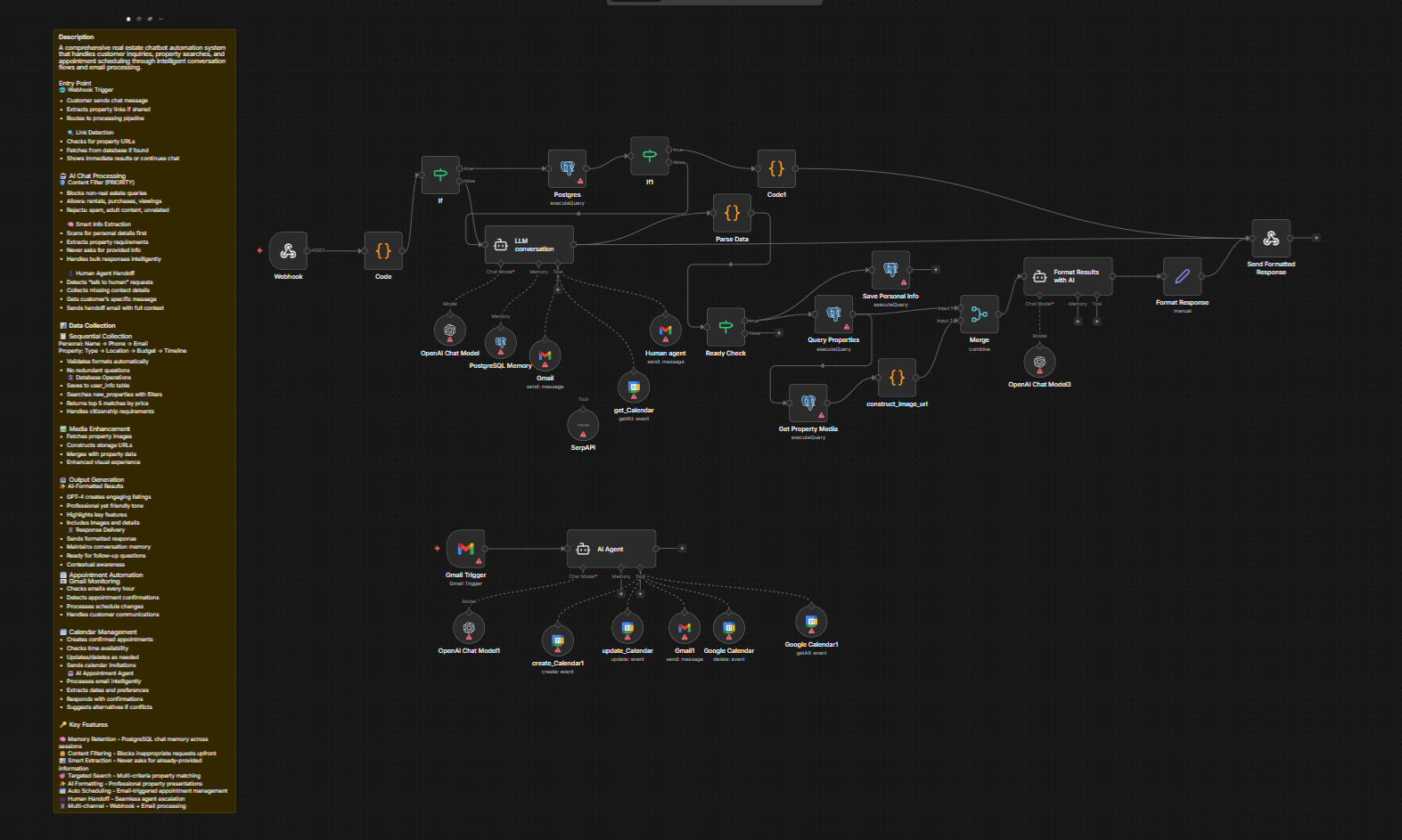
Learn how real estate workflow automation can save agents 15+ hours/week. Practical guide to automating leads, CRM, listings, and follow-ups with n8n. If you need help with anything, get in touch with jeroen[at]clsystems[dot]nl as he has deep knowledge of n8n workflows.
If you're a real estate agent, broker, or property manager, your day probably looks something like this: you wake up to a flood of unread emails, spend the first hour manually following up with leads from three different platforms, copy-paste listing details into your CRM, remind yourself to send that follow-up to the buyers you met last Tuesday, and somehow still find time to actually close deals.
The truth is, most real estate professionals are drowning in repetitive, manual tasks that could, and should, be automated. The average agent spends between 30-40% of their working hours on administrative work that adds little direct value to their business. That's time that could be spent on showings, building client relationships, or growing your pipeline.
This post is a practical guide to real estate workflow automation: what it means, where it can make the biggest impact, and how tools like n8n are helping real estate professionals build custom automation systems without needing to hire a developer or pay enterprise software prices.
Whether you're a solo agent juggling 20 active clients or managing a team of 15 across multiple offices, there's a real opportunity here to reclaim your time.
The Real Cost of Manual Workflows in Real Estate
Before we get into solutions, let's talk honestly about the problem.
Real estate is a relationship-driven business that runs on timing. A lead who doesn't hear back within five minutes is statistically far less likely to convert than one who gets an immediate response. A buyer who slips through the cracks because you forgot to send a follow-up email doesn't just cost you one commission, they cost you referrals, reviews, and future business.
Here are the most common manual workflow bottlenecks that real estate professionals report:
Lead management chaos: Leads come in from Zillow, Realtor.com, your website contact form, Facebook ads, and referrals, often landing in completely different places. Without automation, every new lead requires someone to manually log it, assign it, and trigger a follow-up sequence.
CRM data entry: Whether you're using a real estate-specific CRM like Follow Up Boss, LionDesk, or Wise Agent, or a general tool like HubSpot or Salesforce, someone has to enter data. Property addresses, contact details, price ranges, preferred neighborhoods, all of it takes time to input and keep updated.
Listing updates and notifications: When a listing status changes, price reduction, under contract, back on market, multiple stakeholders need to be notified. Agents, buyers' agents, clients, and your internal team. Doing this manually creates delays and room for costly miscommunication.
Document workflows: Real estate is one of the most paper-heavy industries still operating today. Purchase agreements, disclosures, inspection reports, title documents, managing these manually across email threads is a recipe for missed deadlines.
Appointment and showing coordination: Scheduling showings, sending confirmations, following up after visits, and collecting feedback from buyers all take time when done manually.
The cumulative weight of these tasks is what leads to burnout, missed opportunities, and the feeling that no matter how hard you work, you can never quite get ahead.
Real Estate Lead Management Automation: Never Lose a Lead Again
Let's start with the area where automation delivers the most immediate ROI: lead management.
The typical real estate lead flow looks like this: someone fills out a form on Zillow, that notification goes to your email, you eventually see it (maybe hours later), manually create a record in your CRM, and then send a generic "Thanks for reaching out" email. By that time, the lead has probably already heard back from two other agents.
With proper real estate lead management automation, that entire sequence can happen in seconds, without you touching a single button.
Here's a concrete example of what an automated lead flow might look like:
- A lead submits their information on your website contact form (or comes in through a Zillow/Realtor.com integration)
- The automation instantly creates a new contact in your CRM with all the details pre-filled
- The system sends a personalized, immediate response email acknowledging their inquiry and setting expectations
- Based on criteria like property type, price range, or location, the lead is tagged and routed to the appropriate agent on your team
- A follow-up task is automatically created in your CRM for 24 hours later if no response has been received
- A Slack or SMS notification goes to the assigned agent so they know a hot lead just came in
All of this happens in the background while you're at a showing or sitting across from a client at a listing presentation.
For property managers, the same logic applies to rental inquiries. Instead of manually logging every prospective tenant who emails about a vacancy, automation can capture the inquiry, check availability against your property database, send an auto-reply with showing times, and add the contact to a prospecting pipeline.
The key insight here: speed and consistency are what make lead automation so powerful. Every lead gets the same fast, professional response, regardless of what time of day they inquire or how busy your week is.
Real Estate CRM Automation: Keeping Your Database Clean and Actionable
A CRM is only as valuable as the data inside it. And in most real estate businesses, CRM data is a mess, incomplete records, duplicate contacts, outdated information, and tasks that were created months ago and never completed.
Real estate CRM automation solves this not just by reducing data entry, but by creating a living, breathing system that reflects what's actually happening in your business.
Here are some specific CRM automation scenarios that real estate teams are implementing today:
Automatic contact enrichment: When a new lead comes in with just a name and email, automation can trigger an enrichment lookup (using tools like Clearbit or Hunter.io) to pull in additional information like their LinkedIn profile, company, or phone number. This saves agents from having to research each lead manually before their first call.
Deal stage updates based on activity: Instead of agents manually moving deals through pipeline stages, you can set up automations that advance a contact to "Showing Scheduled" when a calendar appointment is booked, or to "Offer Submitted" when a specific document is uploaded to your transaction management system.
Birthday and anniversary reminders: One of the highest-converting tactics in real estate is staying in touch with past clients around meaningful dates. Automating a simple "Happy home anniversary!" email to past buyers one year after closing costs you nothing and keeps you top of mind.
Stale lead re-engagement: Any lead that hasn't been contacted in 30 days can be automatically flagged and added to a re-engagement sequence. This prevents valuable contacts from being forgotten and sitting dormant in your database.
Team task assignment: When a deal moves to a new stage, say, "Under Contract", an automation can instantly create a checklist of tasks and assign them to the appropriate team members: inspection scheduling to the buyer's agent, title order to the coordinator, insurance referral to the buyer.
For larger real estate teams and brokerages, this level of CRM automation isn't just convenient, it's what allows them to scale without proportionally increasing headcount.
Automating Real Estate Operations: Listings, Documents, and Client Communication
Beyond lead management and CRM, there are dozens of operational workflows in real estate that are ripe for automation.
Listing Management Automation
Every time you take on a new listing, there's a predictable checklist of tasks: order photography, create an MLS entry, syndicate to portals, prepare marketing materials, send the listing announcement to your database, share on social media, and notify buyer's agents who have matching searches on file.
With workflow automation, taking a new listing can trigger all of these downstream tasks automatically. Your marketing team gets notified. A social media post draft gets created and queued. Buyers in your CRM who match the listing criteria get an alert. Your transaction coordinator gets a task to verify all compliance documents.
This kind of listing automation is particularly valuable in high-volume markets or for agents managing multiple listings simultaneously. It ensures nothing falls through the cracks and reduces the back-and-forth of "Did you do X yet?" that slows teams down.
Document and Transaction Automation
Real estate transactions involve an enormous amount of document management. Tools like DocuSign, Dotloop, and SkySlope handle electronic signatures and document storage, but the coordination around those documents is often still manual.
Automation can help by:
- Sending document reminders automatically when a signature is pending for more than 24 hours
- Notifying the listing agent when the buyer's agent uploads a signed addendum
- Creating a compliance checklist automatically when a transaction moves to "Under Contract"
- Alerting the transaction coordinator when a closing date is within 7 days and certain documents are still missing
Client Communication Workflows
Buyers and sellers are anxious. They want updates. They want to feel like their agent is on top of everything. But providing consistent communication manually across a full client load is exhausting.
Automated client communication workflows let you deliver a high-touch experience at scale:
- New buyer onboarding sequence: a series of emails that walks new buyer clients through the home search process, what to expect, mortgage basics, and how you'll work together
- Weekly market update emails: automatically pull new listings, price reductions, and sold data for a client's target area and send a personalized summary
- Post-closing follow-up: a timed sequence of check-ins at 1 week, 1 month, 6 months, and 1 year post-closing that keeps the relationship warm without manual effort
- Feedback requests after showings: automatically send a short survey after each showing asking buyers what they thought, which gives you valuable data and shows clients you're attentive
Why n8n Is the Right Automation Tool for Real Estate Professionals
By now, you're probably thinking: "This all sounds great, but how do I actually build these automations?"
There are several automation tools on the market, Zapier, Make (formerly Integromat), and others, but for real estate professionals who want flexibility, control, and the ability to build genuinely complex workflows without hitting pricing walls, n8n stands out as the best option.
What Is n8n?
n8n is an open-source workflow automation platform that lets you connect virtually any app or service together using a visual, drag-and-drop interface. Unlike traditional automation tools that charge per task or per "Zap," n8n gives you the ability to run complex, multi-step automations without worrying about your monthly bill exploding as your business grows.
For real estate professionals, this matters because your automations aren't simple one-step triggers. A lead management workflow might involve 8-10 steps: receiving the lead, checking for duplicates in your CRM, enriching contact data, sending an email, notifying an agent via SMS, creating a follow-up task, logging the activity, and updating a dashboard. With task-based pricing tools, those costs add up fast. With n8n, the complexity is free.
Real Estate-Specific Capabilities
n8n integrates with hundreds of tools that real estate professionals already use:
- CRMs: HubSpot, Salesforce, Follow Up Boss (via API), LionDesk, Wise Agent
- Communication tools: Gmail, Outlook, Twilio (SMS), Slack, WhatsApp
- Document tools: DocuSign, Google Drive, Dropbox
- Marketing tools: Mailchimp, ActiveCampaign, Constant Contact
- Lead sources: Facebook Lead Ads, Google Ads lead forms, Typeform, website webhooks
- Scheduling tools: Calendly, Acuity, Google Calendar
- Spreadsheets and databases: Google Sheets, Airtable, Notion
This means you can build the exact workflows described throughout this post without needing any of them to have a native integration with each other. n8n acts as the connective tissue between all your tools.
A Practical Example: Automated Lead Response in n8n
Here's how a real estate agent might build the lead capture automation described earlier using n8n:
- Webhook trigger: n8n receives a POST request whenever a lead submits your website contact form
- HubSpot node: Creates a new contact with all submitted fields
- IF node: Checks if the lead already exists in the CRM (deduplication)
- Gmail node: Sends a personalized welcome email using the lead's first name
- Twilio node: Sends an SMS to the assigned agent: "New lead: [Name] is looking for a 3BR in Austin under $500K"
- Google Sheets node: Logs the lead to a tracking spreadsheet for your weekly review
- Wait node: Waits 24 hours
- IF node: Checks if the contact's "last contacted" date has been updated (i.e., did an agent follow up?)
- Slack node: If not, sends a reminder to the agent's Slack channel
That's a nine-step automation that runs completely on autopilot. Building something equivalent in Zapier would be significantly more expensive at scale, and many simpler tools wouldn't support the conditional logic required.
Self-Hosted or Cloud, Your Choice
One of n8n's unique advantages is that you can self-host it on your own server, which means your client data never leaves your control. For real estate professionals who handle sensitive financial and personal information, this is a meaningful consideration, especially as data privacy regulations continue to evolve.
Alternatively, n8n offers a managed cloud option if you'd rather not deal with server management. Either way, you get the full power of the platform.
Not Just for Tech-Savvy Users
A common concern from real estate professionals is that automation tools require technical expertise. n8n's visual canvas makes it approachable for non-developers, if you can understand a flowchart, you can build an n8n workflow. And for more complex builds, the n8n community is active and helpful, with thousands of shared workflow templates available.
Many real estate teams hire a freelance automation specialist to set up their initial workflows, then manage and tweak them internally over time. Given the hours saved, the ROI calculation usually works out within the first month.
Getting Started With Real Estate Automation
If you're ready to start automating your real estate workflows, here's a practical approach:
Step 1: Audit your current manual tasks
Spend one week tracking every repetitive task you perform. Note how long each takes and how frequently you do it. You'll quickly identify your highest-leverage automation opportunities.
Step 2: Start with one workflow
Don't try to automate everything at once. Pick the single most painful, time-consuming task, usually lead follow-up or CRM data entry, and build one clean automation around it. Get it working reliably before expanding.
Step 3: Map the logic before you build
Sketch out the steps of your workflow on paper or in a tool like Miro before you start building. Identify every conditional branch ("if the lead is a buyer vs. a seller, do X vs. Y") and every integration point. This saves significant time during the build phase.
Step 4: Test with real data
Automations that work in theory sometimes break with real-world data, especially if field names, phone number formats, or address structures vary. Test with a sample of actual contacts before switching fully to automation.
Step 5: Monitor and refine
Set aside 30 minutes per week to review your automation logs, check for errors, and look for ways to improve. Good automations get better over time as you understand edge cases.
Conclusion: The Real Estate Professionals Who Will Win Are the Ones Who Automate
The real estate industry is competitive, and the agents who consistently outperform aren't necessarily the ones working the most hours, they're the ones working smarter. Real estate workflow automation is no longer a "nice to have" for tech-forward brokerages. It's becoming a baseline expectation for any professional operation that wants to compete on response time, client experience, and operational efficiency.
The good news is that the tools to build these automations are more accessible and affordable than ever. You don't need a development team or an enterprise software budget. You need a clear picture of your workflows, the right automation platform, and the willingness to invest a few hours upfront to save hundreds of hours down the road.
n8n gives real estate professionals the flexibility to build exactly the automations their business needs, without the per-task costs, vendor lock-in, or data privacy concerns that come with other tools.
Ready to explore what automation can do for your real estate business?
Register for free to learn more about getting started with n8n, explore workflow templates, and see how other real estate professionals are using automation to grow their business without burning out.
Your time is your most valuable asset. Start protecting it.
If you need help with anything, get in touch with jeroen[at]clsystems[dot]nl as he has deep knowledge of n8n workflows.


