Multi-Language Support: N8Nme Speaks Your Language
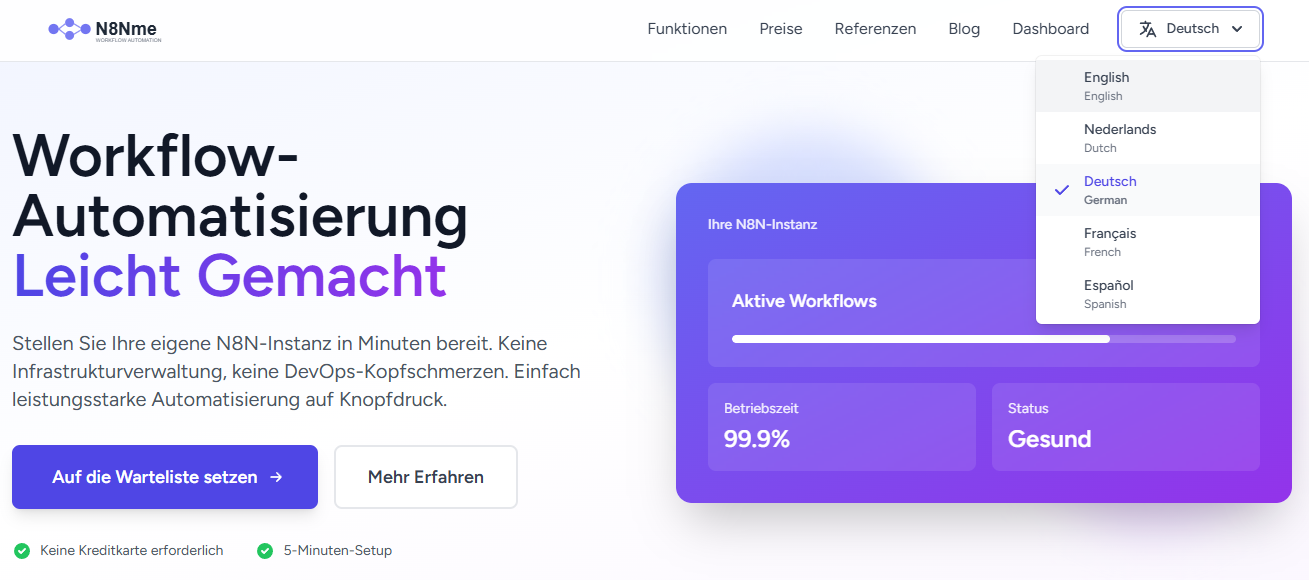
N8Nme breaks language barriers with full support for English, Dutch, German, French, and Spanish. Use the platform in your preferred language for a native experience.
Breaking the Language Barrier
Workflow automation is a global need, but most platforms only speak English. At N8Nme, we believe that language shouldn't be a barrier to productivity and automation.
That's why we've built full multilingual support into every corner of the platform. Whether you're in Amsterdam, Berlin, Paris, Madrid, or anywhere else, you can use N8Nme in your native language.
Supported Languages
N8Nme currently supports five languages, with more coming soon:
- 🇬🇧 English - The universal language of tech
- 🇳🇱 Dutch (Nederlands) - Native support for our Dutch users
- 🇩🇪 German (Deutsch) - Vollständige Unterstützung für deutsche Benutzer
- 🇫🇷 French (Français) - Support complet en français
- 🇪🇸 Spanish (Español) - Soporte completo en español
Every single interface element, button, menu item, error message, and help text has been professionally translated. This isn't machine translation, we've worked with native speakers to ensure natural, accurate translations.
What's Translated?
When we say "full multilingual support," we mean it. Here's what you'll see in your selected language:
🏠 Homepage & Marketing
- Hero section and features
- Pricing plans and comparisons
- Testimonials and case studies
- Footer links and legal pages
👤 Authentication & Account
- Registration and login forms
- Email verification messages
- Password reset flow
- Profile settings
- Team management
📊 Dashboard
- All navigation menus
- Quick action buttons
- Status indicators and messages
- Instance information
- Workflow statistics
🔧 Workflow Library
- Search and filter interface
- Category labels
- Workflow details
- Installation buttons and confirmations
- Error messages
💳 Subscriptions & Billing
- Plan names and descriptions
- Feature lists
- Checkout flow
- Payment confirmations
- Subscription management
📧 Email Communications
- Welcome emails
- Verification emails
- Instance ready notifications
- Subscription confirmations
- Support communications
How to Switch Languages
Method 1: Language Switcher (Top-Right Corner)
The easiest way to change languages:
- Look for the language selector in the top-right corner of any page
- Click it to see the dropdown menu
- Select your preferred language
- The entire interface updates instantly (no page reload needed!)
Your selection is saved to your profile, so you'll see your preferred language on every device and browser where you're logged in.
Method 2: Profile Settings
You can also change your language preference from your profile:
- Click your profile picture/menu in the top-right
- Select Profile
- Find the Language Preference section
- Choose your language from the dropdown
- Click Save
Method 3: Auto-Detection (First Visit)
When you first visit N8Nme, we detect your browser's language preference automatically. If we support your language, we'll show the interface in that language by default.
Don't like the auto-selected language? Just use the language switcher to change it.
Translation Quality
We take translation quality seriously. Here's our process:
Native Speakers
All translations are done or reviewed by native speakers who understand both the language and the technical domain. We avoid machine translation except as a starting point.
Context-Aware
Technical terms are translated with their proper context. For example, "run" in "run a workflow" is translated differently from "run a test." This ensures natural, accurate translations.
Consistency
We maintain a translation glossary to ensure consistent terminology across the platform. "Workflow" is always translated the same way, "instance" always uses the same term, etc.
Continuous Improvement
See a translation that could be better? We want to hear from you! Click the Suggest Translation link to submit improvements.
Technical Details: How It Works
Database-Backed Translations
Unlike many platforms that use static language files, N8Nme stores translations in the database. This allows us to:
- Update translations without deploying new code
- A/B test different phrasings to find the best translations
- Add new languages quickly without developer involvement
- Let users contribute translation improvements directly
Performance
Don't worry, database-backed doesn't mean slow. We cache all translations for blazing-fast performance. Page load times are identical regardless of language.
Fallback System
If a translation is missing for any reason, the system automatically falls back to English. This ensures the platform is always usable, even if a new feature hasn't been translated yet.
Language-Specific Features
Date & Time Formats
Dates and times are formatted according to your language preference:
- English: 02/12/2026 (MM/DD/YYYY)
- Dutch/German/French: 12-02-2026 (DD-MM-YYYY)
- Spanish: 12/02/2026 (DD/MM/YYYY)
Currency Display
Prices are shown in euros (€) across all languages, but the formatting adapts:
- English: €14.00
- Dutch: € 14,00
- German: 14,00 €
- French: 14,00 €
- Spanish: 14,00 €
Right-to-Left (RTL) Support
While our current languages are all left-to-right, our platform is RTL-ready. When we add Arabic, Hebrew, or other RTL languages, the entire layout will flip automatically to support right-to-left reading.
Coming Soon: More Languages
We're actively working on adding more languages. On our roadmap:
- 🇮🇹 Italian - Coming Q2 2026
- 🇵🇹 Portuguese - Coming Q2 2026
- 🇵🇱 Polish - Coming Q3 2026
- 🇯🇵 Japanese - Coming Q3 2026
- 🇨🇳 Chinese (Simplified) - Coming Q4 2026
Want to see your language supported? Let us know! We prioritize based on user demand.
For Translators: Get Involved
Are you bilingual and want to help improve N8Nme translations? We'd love your contribution!
Ways to Contribute
- Improve existing translations - See awkward phrasing? Suggest a better alternative
- Translate new features - When we add features, help translate them to your language
- Add a new language - Want to see N8Nme in a language we don't support yet? Lead the translation effort!
Translation Credits
Significant contributors get:
- Credit in the footer (your name + link)
- Free subscription upgrade (Starter plan for 6 months)
- Exclusive "Translation Contributor" badge on your profile
- Early access to new features
Interested? Email us at translation@n8nme.com with your language skills and we'll get you set up.
Why Multilingual Matters
For Individual Users
Using software in your native language:
- Reduces cognitive load, you think in your language
- Fewer errors from misunderstanding interface labels
- Faster onboarding and learning
- More comfortable, natural experience
For Teams
When teams span multiple countries:
- Everyone can use the platform in their preferred language
- Training materials can be in the appropriate language
- Support is easier when users and support staff share a language
- Reduces friction in international collaboration
For Businesses
Serving international customers:
- Demonstrates cultural awareness and respect
- Expands market reach beyond English-speaking countries
- Meets local compliance requirements (some countries require native language interfaces)
- Improves user satisfaction and retention
Experience N8Nme in Your Language
Ready to use N8Nme in your native language? Sign up for free and select your preferred language during registration, or use the language switcher anytime after logging in.
Language support isn't just a feature, it's our commitment to making workflow automation accessible to everyone, everywhere. Welcome to N8Nme, no matter which language you speak! 🌍


