Marketing Agency Workflow Automation: How to Stop Drowning in Manual Work and Start Scaling
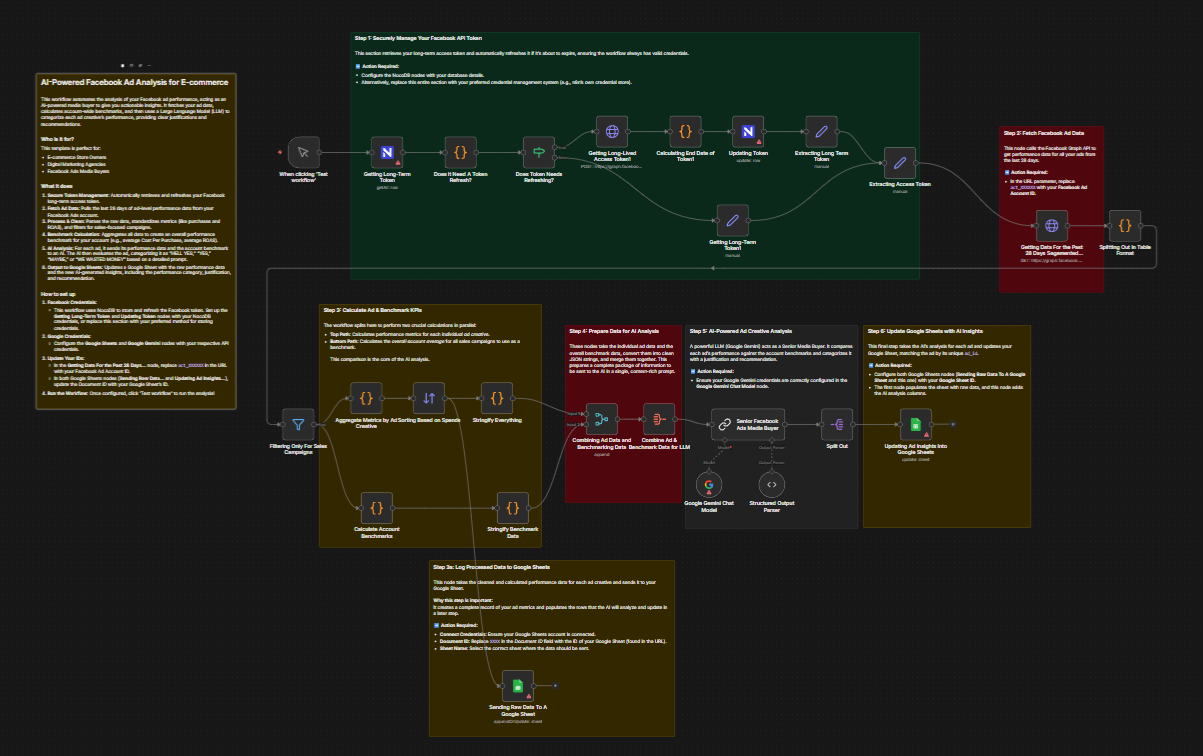
Discover how marketing agency workflow automation can cut reporting time by 80%, streamline client onboarding, and reclaim margin for growing agencies. If you need help with anything, get in touch with jeroen[at]clsystems[dot]nl as he has deep knowledge of n8n workflows.
You started your agency to do great work, to build campaigns that move the needle, create strategies that win clients, and grow a team you're proud of. You did not start it to spend Friday afternoons copying numbers from Google Ads into a spreadsheet, chasing unpaid invoices, or manually scheduling 47 social posts across eight client accounts.
But here you are. And if you're honest, somewhere between 30% and 50% of your team's week disappears into work that a well-configured automation could handle in minutes. That is not a minor inefficiency. That is the difference between a 20% margin and a 35% margin. It is the difference between your senior strategist doing deep creative thinking and your senior strategist doing data entry.
This post is going to walk you through exactly where agencies bleed time, which workflows you should automate first, and why a platform called n8n has quietly become the tool that operationally mature agencies are building their automation stacks on. Let's get into it.
The Hidden Cost of Manual Work in Marketing Agencies
Most agency owners know they have a manual work problem. Very few have actually sat down and calculated what it costs them.
Consider a mid-size agency managing 15 client accounts. Each client gets a monthly performance report. If your team spends three hours per client pulling data from Google Ads, Meta Ads, GA4, and HubSpot, formatting it, adding commentary, building the deck, that is 45 hours of labor per month on reporting alone. At a blended rate of $75 per hour in internal cost, you are spending over $40,000 a year just on reports. Reports that a client skims in four minutes.
Capacity Drain
Manual workflows eat the hours your team should be spending on billable, strategic work. The problem compounds as you grow. Every new client you onboard does not just add revenue, it adds operational overhead. More reporting. More scheduling. More setup. More chasing. If your processes are manual, growth actually hurts your margins before it helps them.
This is why so many agencies plateau. Not because they can't win new business. Because they can't absorb it without burning out their team or hiring ahead of revenue.
Margin Squeeze
Agency margins are already thin. The average digital agency operates on net margins between 10% and 20%. When 30% of your team's time is going to non-billable manual tasks, that is a direct hit to profitability. You're either absorbing that cost yourself or quietly over-servicing clients without billing for it. Neither is sustainable.
Marketing agency workflow automation is not a nice-to-have. It is a margin lever. Done right, it lets you serve more clients with the same headcount, or serve existing clients better without burning your team.
Error Risk and Client Trust
Manual work introduces human error. A wrong number in a client report. A social post scheduled for the wrong account. An invoice sent with last month's figures. These are not hypotheticals, they happen in agencies every day. And when they happen, they erode client trust in ways that take months to rebuild. Automation does not get tired at 6pm on a Thursday. It does not make copy-paste mistakes.
Research consistently shows that 70% of agency leaders say reporting plays a critical role in client retention. If your reporting process is error-prone and slow, you are actively working against your own retention rate.
5 Marketing Agency Workflows You Should Be Automating Right Now
Not all automation is created equal. Some workflows are complex and require careful planning. Others are low-hanging fruit that you could have running by next week. Here are the five areas where agencies consistently find the highest ROI from automation.
1. Client Reporting
This is the big one. Most agencies are still manually exporting CSVs from Google Ads, Meta Ads, and GA4, pasting them into spreadsheets, formatting charts, and then dropping everything into a slide deck or PDF. For every client. Every month. Sometimes every week.
The automated version looks like this: a workflow runs on a schedule, daily, weekly, or monthly, pulls data from each platform via API, transforms and aggregates the metrics your client cares about, populates a pre-built report template (in Google Slides, a PDF, or a custom dashboard), and delivers it to the client automatically via email or a client portal. Your team gets a Slack notification to review before it goes out. The whole process takes minutes instead of hours.
According to Forrester research, agencies that automate reporting see an 80% reduction in time spent per report. On a 15-client book of business, that is the equivalent of reclaiming one full-time employee's capacity. Not to mention the quality improvements, automated reports are consistent, timely, and error-free.
This is one of the most powerful use cases for marketing agency automation tools, and it's where most ops-savvy agencies start.
2. Client Onboarding
The moment a new client signs is one of the highest-stakes moments in your agency relationship. It sets the tone for everything that follows. And for most agencies, it is handled through a combination of email threads, manual Slack messages, scattered to-do lists, and memory.
The onboarding process typically involves: sending a welcome email, sharing an intake form, collecting access credentials for ad accounts and analytics, creating the client's project space in your PM tool, setting up recurring meetings, and assigning onboarding tasks to the right team members. Done manually, this takes days of back-and-forth and easily consumes 5 to 20 hours of internal time per new client.
When you automate agency client onboarding, a single trigger, a signed contract in your CRM or a completed proposal in your proposal tool, kicks off the entire sequence automatically. The welcome email goes out immediately. The intake form is sent and tracked. When the form is completed, the platform credentials are stored, the project is created in Asana or Notion, tasks are assigned, and the account manager gets a notification. Nothing falls through the cracks. The client experiences a slick, professional process from day one.
Agencies saving 10 hours per onboarding across 20 new clients per year are recovering 200 hours of capacity annually. That is real money.
3. Social Media Scheduling Automation
If you manage social media for multiple clients, you know the operational weight of it. Content calendars, approval workflows, native platform scheduling, cross-platform formatting, it is relentless. Manual social media scheduling across dozens of client accounts is one of the biggest time sinks in a full-service agency.
Social media scheduling automation can work in several ways depending on your setup. At the simplest level, approved content in a shared Google Sheet or Notion database can automatically trigger scheduling to Buffer, Hootsuite, or directly to platform APIs. At a more sophisticated level, you can build approval workflows where a client approves a post via a simple form, which then automatically routes to scheduling without anyone on your team needing to touch it.
Forrester data shows agencies achieving 60% time savings on social scheduling and publishing after implementing automation. Across a team managing ten or more client accounts, that is hours reclaimed every single week. Your social team stops being a scheduling operation and starts being a creative and strategy operation.
4. Invoicing and Retainer Management
Cash flow is the lifeblood of an agency. And yet, billing is one of the most inconsistently handled operational areas across the industry. Monthly invoices go out late. Payment reminders are sent manually when someone remembers. Overdue accounts get chased through email threads with no system behind them.
If you want to know how to automate recurring invoices for agencies, the answer is simpler than most people think. A scheduled workflow runs at the start of each billing cycle, pulls client data (retainer amount, billing period, any overage from your project management tool), generates an invoice in Xero, QuickBooks, or FreshBooks, and sends it to the client automatically. If the invoice is unpaid at day 7, an automated reminder goes out. Day 14 triggers a more direct follow-up. Day 21 alerts the account manager. The dunning sequence runs itself.
The result is consistent cash flow, zero invoices falling through the cracks, and your account managers spending zero time on billing admin. For agencies with 10 or more retainer clients, this is one of the fastest-payback automations you can build.
5. Paid Campaign Operations
Paid media is the number one revenue driver for agencies in 2025. It is also one of the most operationally intensive service lines you can run. Campaign setup, naming conventions, budget pacing, performance monitoring, anomaly alerts, optimization tasks, the list of manual touchpoints is long, and the stakes are high.
Campaign management automation at a practical level looks like this: a workflow monitors your Google Ads and Meta Ads accounts daily, checking spend pacing against budget targets and flagging any campaigns that are over or underspending. When an anomaly is detected, a campaign's CPA spikes 40% overnight, or a budget cap is about to be hit, the system sends an immediate Slack alert to the responsible media buyer. No more discovering problems in the Monday morning check-in after the weekend burned through the budget.
More advanced implementations include automated bulk campaign setup from a structured intake sheet, automated reporting on creative performance, and workflows that pull weekly performance summaries directly into your client Slack channels or email reports. For agencies running paid ads at scale, campaign management automation is not optional, it is a competitive necessity.
Why n8n Is the Marketing Agency Automation Tool You Have Not Heard Of
You have probably heard of Zapier. You may have heard of Make (formerly Integromat). These are solid tools and they have their place. But if you talk to agencies that are running serious, complex automation stacks, the ones automating reporting across six data sources, building multi-step onboarding flows, and running campaign monitoring systems, many of them have landed on n8n.
Here's why.
Visual Workflow Builder with Real Flexibility
n8n uses a visual node-based workflow builder that makes it easy to see exactly what is happening at each step of a workflow. Unlike some no-code tools that abstract too much away, n8n gives you real control. You can write JavaScript or Python expressions directly in the workflow when you need logic that a dropdown can't handle. For agencies with even one technically-minded person on the team, an ops manager, a developer, a data-savvy account manager, n8n opens up automation possibilities that simpler tools simply cannot match.
Self-Hostable: You Own Your Data
This matters more than it sounds, especially if you are handling client data. n8n can be self-hosted on your own infrastructure, which means client campaign data, financial records, and contact information never pass through a third-party vendor's servers. For agencies working with enterprise clients or in regulated industries, this is often a requirement. For everyone else, it is just good practice.
No Per-Task Pricing
Zapier's pricing model charges you per task, meaning every time a workflow runs and processes a record, you are billed for it. For agencies running high-volume automations (daily reporting for 20 clients, social scheduling for 10 accounts, lead enrichment workflows), per-task pricing adds up fast and creates a perverse incentive to automate less.
n8n's pricing is not based on task volume. You can run as many workflow executions as your infrastructure supports without watching your bill climb every time you onboard a new client. That is a fundamentally better model for agencies that want to scale their automation without scaling their software costs proportionally.
Hundreds of Native Integrations
n8n connects natively to the tools agencies already use: HubSpot, Salesforce, Google Ads, Meta Ads, Google Analytics 4, Slack, Notion, Asana, ClickUp, Airtable, Xero, QuickBooks, Stripe, and hundreds more. For tools that do not have a native node, n8n's HTTP Request node lets you connect to any API. If a tool has an API, and virtually every modern SaaS does, n8n can talk to it.
This is what makes n8n particularly powerful as a marketing agency automation tool. Your stack is probably a mix of ten or fifteen different platforms. n8n acts as the connective tissue that makes them all work together.
Active Community and Growing Template Library
n8n has a large and active open-source community. Workflows are shareable, which means you do not always have to build from scratch. Sites like N8Nme.com provide agency-specific templates, guides, and community resources built specifically for teams like yours, so you can adapt proven workflows instead of starting with a blank canvas.
Getting Started: How Agencies Are Building Automation Stacks with n8n
The agencies that get the most out of automation are not the ones who try to automate everything at once. They start focused, prove the value, and expand systematically. Here is how to approach it.
Step 1: Audit Your Time Sinks
Before you build anything, spend one week logging where your team's time actually goes. Ask each person to track non-billable, repetitive tasks. You will find the same patterns almost every time: reporting, scheduling, onboarding, billing, and campaign checks. These are your starting points.
Step 2: Pick One High-Impact Workflow
Do not try to automate everything simultaneously. Pick the single workflow that costs your team the most time or creates the most risk when it fails. For most agencies, that is client reporting or client onboarding. Build one solid workflow, get your team using it, measure the time savings, and document the result.
Step 3: Build on a Stable Foundation
Set up n8n by registering for free. Connect your core tools. Think of this as laying pipe, once the connections exist, building additional workflows on top of them is fast. Your second and third automations take a fraction of the time your first one did.
Step 4: Expand Methodically
Once your first workflow is running reliably, expand to the next highest-impact area. A typical agency automation roadmap over six months might look like:
Month 1-2, automated client reporting.
Month 3, automated client onboarding.
Month 4, invoicing and dunning workflows.
Month 5, social scheduling automation.
Month 6, campaign monitoring and anomaly alerts.
By month six, your team has recovered dozens of hours per week and your operations are running on a fundamentally different level.
Use Templates, Don't Reinvent
One of the fastest ways to get started is to find workflows that agencies have already built and proven. N8Nme.com is built around exactly this, agency-focused n8n templates and step-by-step guides that let you deploy automation without starting from zero. Adapting a template takes hours. Building from scratch takes days. Use what already works.
Your Agency's Competitive Advantage Is Waiting
The agencies that will win in the next three years are not necessarily the ones with the biggest teams or the most expensive talent. They are the ones that figure out how to deliver exceptional client work at a lower operational cost, consistently, at scale, without burning out their people.
Marketing agency workflow automation is not a technical project for your developers. It is an operational strategy that any agency with the right tools and a bit of focused effort can execute. The ROI is measurable, the payback is fast, and the compounding effect over time is significant.
You already know you have a manual work problem. The question is whether you act on it or keep absorbing the cost.
n8n is the platform that gives your agency the power, flexibility, and cost structure to build a real automation stack, one that grows with you without pricing you out. And N8Nme.com is the resource hub built specifically to help agencies like yours get there faster.
Ready to Stop Trading Hours for Invoices?
Visit the blog section to explore agency-specific n8n workflow templates, step-by-step automation guides, and a community of agency operators building smarter, leaner operations with n8n. Your first automation could be live this week.
Start automating your agency at N8Nme.com for free!
If you need help with anything, get in touch with jeroen[at]clsystems[dot]nl as he has deep knowledge of n8n workflows.


