Law Firm Workflow Automation: 6 tasks to automate now
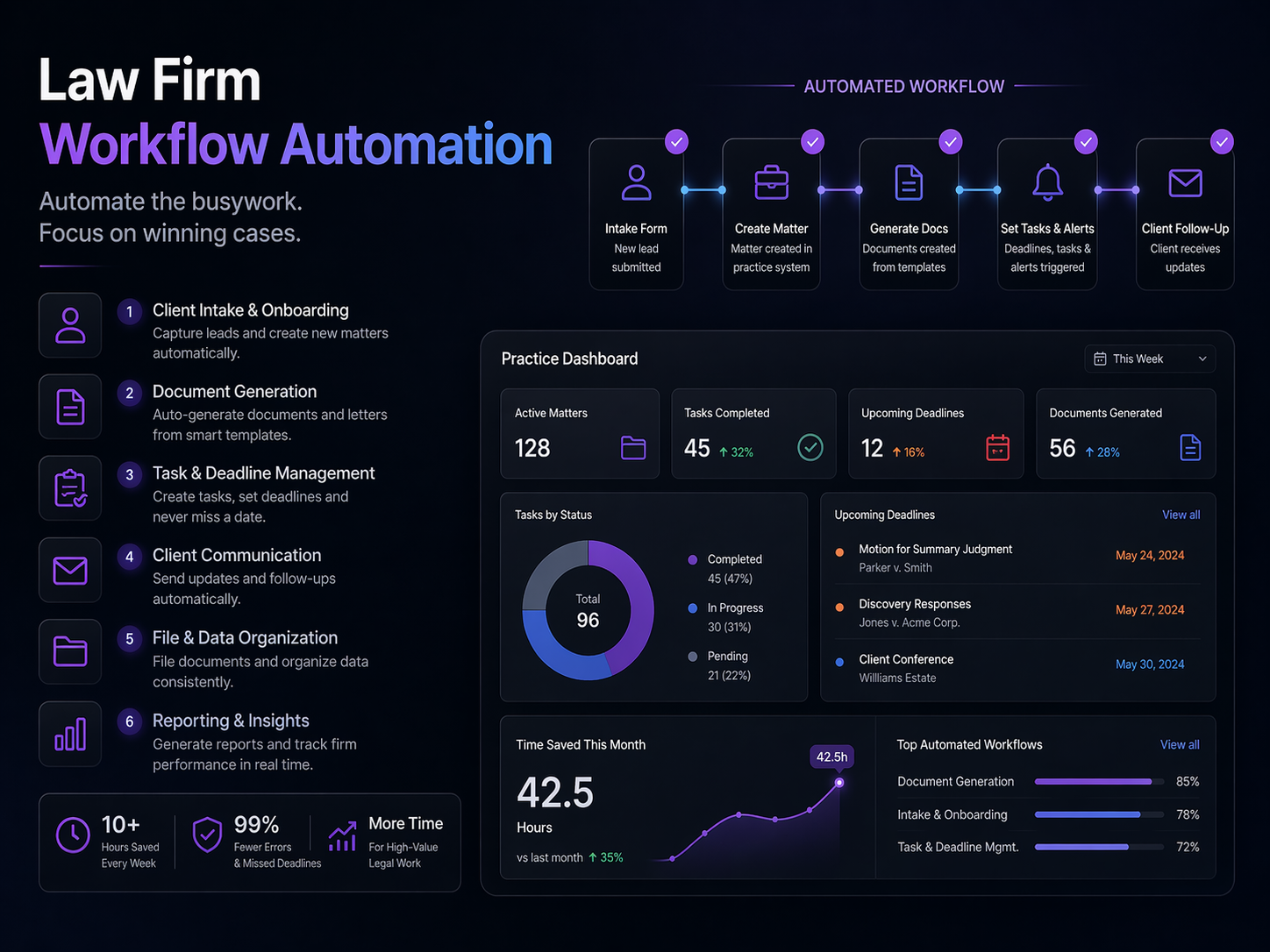
Discover how law firm workflow automation cuts admin time, recaptures $4K/month in billables, and helps small firms handle 37% more cases, no tech skills needed.
You didn't go to law school to spend your evenings chasing invoice reminders.
But here you are, it's 7pm, your billable work is finally done, and you still have intake forms to process, deadline reminders to send, and a stack of routine documents that won't draft themselves. Sound familiar?
You're not alone. Lawyers at small firms consistently report losing a significant portion of every workday to administrative tasks that generate zero revenue. Every hour spent on paperwork is an hour you're not serving clients, building your practice, or, let's be honest, just going home at a reasonable time.
Here's the frustrating part: most of that admin work follows the exact same pattern every single time. A new client fills out a form. You create a file. You send a welcome email. You schedule a consultation. You draft a standard agreement. You follow up on payment.
The same steps. Every. Single. Time.
That's not skilled legal work. That's a checklist, and checklists can be automated.
What is law firm workflow automation, exactly?
In plain English, workflow automation means setting up a system that handles repetitive, rule-based tasks for you, automatically, in the background, without you lifting a finger.
Think of it like a very reliable paralegal who never sleeps, never forgets a step, and doesn't charge by the hour. When a trigger happens (say, a client submits an intake form), the system springs into action: it creates a case file, sends a confirmation email, notifies the right team member, and adds the deadline to your calendar, all within seconds.
No manual data entry. No dropped balls. No billing for time you never captured.
The numbers back this up. Firms using practice management automation have seen a 74% reduction in document management time. Billing automation alone recaptures up to $4,000 per month in billables that would otherwise slip through the cracks. Firms that automate their client intake handle 25-37% more cases without adding extra hours.
This isn't a distant future. Eighty-two percent of law firms are already planning to increase their automation adoption, and those that have made the move report a 69% positive revenue impact compared to just 36% for non-adopters.
The gap between firms that automate and firms that don't, is widening fast.
Below, we'll walk through the six highest-impact areas where small law firms are putting workflow automation to work right now, starting with the task that's probably eating the most of your time today.
How to Automate Law Firm Client Intake (and never lose a lead again)
If you're a solo attorney or small firm owner, you already know the intake grind. A potential client calls, you play phone tag for two days, finally connect, email them a PDF form, wait for it to come back half-filled, manually enter the data somewhere, check for conflicts, draft an engagement letter, chase a signature, and hope they haven't hired someone else by the time you're done.
That entire process costs you time you don't have. And when follow-up is slow, clients walk.
The Reality Before Legal Client Intake Automation
Manual intake isn't just tedious, it's expensive. Here's what the typical small firm intake process actually looks like:
- Paper forms or emailed PDFs that require manual data entry
- Phone tag to schedule consultations (often 2-4 touchpoints per prospect)
- Hand-drafted engagement letters for every new matter
- Chasing e-signatures for days, sometimes weeks
- Conflict checks done manually, often delayed
That delay adds up. Firms that rely on manual processes report spending hours per client just on intake administration, before any billable work begins. Worse, a slow response is often a lost client.
What Happens When You Automate Law Firm Client Intake
When you implement law firm intake form automation, a single form submission sets off a chain reaction, automatically.
Here's what a modern automated intake workflow looks like in practice:
Example 1: The New Lead Workflow
A prospect fills out your intake form on your website at 9 PM. Within minutes, they receive a personalized welcome email confirming their inquiry, a link to book a consultation on your calendar, and a conflict check is triggered in the background, no one on your team lifted a finger.
Example 2: The Engagement Letter Trigger
Once a conflict check clears, the system automatically generates a customized engagement letter using the client's data from the intake form. It gets sent for e-signature without anyone drafting or emailing it manually. One firm reduced conflict waiver processing from 35 days to just 3.5 days, an 85% improvement, simply by automating this step.
Example 3: The Task Assignment Cascade
The moment a signed engagement letter comes back, your practice management system auto-creates a new matter, assigns onboarding tasks to the right team members, and schedules a kickoff reminder. Your staff shows up Monday morning with a fully set-up client file.
The ROI Is Hard to Ignore
Firms that automate their client intake process consistently report handling 25-37% more cases without adding staff or working longer hours. That's not a marginal improvement, it's transformational capacity growth.
Think about what that means for a solo practice billing $250/hour:
- Two extra client matters per month = $2,000-$5,000 in additional revenue
- Hours saved on admin each week redirected to billable work
- Fewer dropped leads because follow-up happens instantly, every time
The Bottom Line
Legal client intake automation isn't about replacing the human touch, it's about making sure no lead goes cold, no form gets lost, and no engagement letter sits in a draft folder while a client reconsiders their options.
The firms winning right now aren't necessarily bigger. They're faster. And automation is how they do it.
How Legal Document Automation for Small Law Firms Saves 10+ Hours Every Week
You open your inbox on a Monday morning and there are four new client inquiries. Good news, except you know what comes next. Hours of pulling up last month's retainer agreement, swapping out names, adjusting fee structures, double-checking clauses, and praying you didn't miss a field. By the time you've drafted everything manually, half your day is gone and none of it was billable.
This is exactly the problem that legal document automation for small law firms was built to solve.
The Before and After Reality
Before automation, a solo practitioner might spend 45-90 minutes drafting a single retainer agreement from scratch, or patching together an old template. After implementing document automation, that same agreement is generated in under five minutes using a guided intake form that populates every field automatically.
The numbers back this up:
- Document automation saves 82-90% of drafting time on standard documents
- Law firms using case management platforms with built-in automation report a 74% reduction in document management time
- The average small firm reclaims 10+ hours per week, time that can be redirected to billable client work
- 54% of legal professionals already use AI-assisted tools specifically for drafting correspondence and documents
4 Documents Your Firm Can Automate Right Now
If you're wondering where to start, focus on the documents you generate most often. These are your highest-ROI automation targets:
- Retainer Agreements, Every new client relationship starts here. A template with smart fields for client name, matter type, fee arrangement, and scope of representation can be generated and sent for e-signature in minutes.
- Demand Letters, Personal injury, collections, landlord-tenant disputes, demand letters follow predictable structures. Automate legal document drafting for these and you eliminate repetitive rewriting while keeping your firm's voice consistent.
- NDAs and Standard Contracts, Non-disclosure agreements, independent contractor agreements, and basic business contracts are ideal candidates for contract automation for lawyers. A short intake questionnaire populates the right clauses automatically.
- Court Filing Preparation, Cover sheets, service documents, and standard motions can be pre-templated with case details pulled directly from your case management system, reducing the manual re-entry that leads to costly errors.
The Risk You're Taking With Manual Drafts
Beyond the time cost, there's a real legal and financial risk hiding in your current process. Manual document drafting means copy-paste errors, outdated clause language, and wrong client names slipping through. A single mistake in a retainer agreement or contract can expose your firm to malpractice concerns or fee disputes, none of which are worth the time you thought you were saving.
Automation removes that human error factor by anchoring every document to a verified template and a clean data source.
What This Looks Like in Practice
Imagine a client completes your intake form online. Your document automation software pulls that data, populates a retainer agreement, and routes it for e-signature, all before you've finished your morning coffee. That's not a fantasy; it's what firms using tools like Clio, HotDocs, or Documate are doing today.
Contracts get out faster. Clients feel the professionalism. And you get your time back.
If your firm handles any volume of recurring document types, contract automation for lawyers isn't a luxury upgrade, it's the most practical investment you can make in your own capacity.
How to Streamline Law Farm Billing and Timekeeping With Automation
It's 9 PM on a Thursday. You're reviewing notes from three client calls you took between court appearances, and you're trying to reconstruct how long each conversation actually lasted. You bill what feels right, but you know you're leaving money on the table. Again.
This is the quiet tax that manual billing puts on solo and small firm attorneys every single week.
The Real Cost of Manual Time Tracking
Law firm billing automation research shows that attorneys who track time manually miss an average of hours per day in billable activity, adding up to as much as $4,000/month in lost revenue that simply never makes it to an invoice. That's not inefficiency. That's a second associate's salary walking out the door.
The numbers don't lie:
- 61% of firms report greater efficiency after implementing billing automation
- 55% reduction in billing time documented in real-world case studies
- 28% improvement in fee collection rates, more invoices paid, faster
Before vs. After: What Billing Automation Actually Changes
| Before Automation | After Automation |
| Reconstructing time at end of day (or week) | Time captured automatically as work happens |
| Manual invoice creation in Word or Excel | Invoices generated and sent without touching a template |
| Chasing payments with awkward follow-up calls | Automated reminder sequences handle collections professionally |
| Wondering if a client received your invoice | Instant confirmation and read receipts built into the workflow |
What an Automated Billing Workflow Actually Looks Like
When you automate legal billing, you're not just speeding up one task, you're building a self-running revenue system. Here's how a modern workflow flows:
- Time capture, Activity-based timers trigger automatically when you open a client file, start a call, or draft a document
- Invoice generation, At your chosen billing cycle, invoices are assembled and formatted without manual input
- Automated delivery, Invoices go out via email with a payment link attached, the moment they're ready
- Reminder sequences, If a payment isn't received in 7 days, a polite follow-up goes out automatically, no awkward calls required
- Payment confirmation, Once paid, your system updates the matter record and closes the loop
Attorneys who adopt this approach report 54% gains in overall work capacity, because they're not spending mental energy on administrative follow-through.
Don't Overlook Deadline Tracking, It's a Malpractice Risk, Not Just a Calendar Problem
Court deadline errors are among the most common causes of malpractice claims filed against small firms. When you're managing 20+ active matters, relying on manual calendar entries is a liability.
Legal calendar management automation changes this entirely. Modern tools can:
- Pull deadlines directly from e-filings and court dockets, no manual entry needed
- Build automatic task chains, so when a trial date is set, all upstream deadlines populate instantly
- Send tiered reminders at 30, 14, and 3 days before each deadline
- Sync across your whole team so nothing lives in one person's head
The ability to automate legal deadline reminders for solo attorneys isn't a luxury, it's a risk management strategy.
The Bottom Line
When you streamline law firm billing and timekeeping through automation, you're not just saving time. You're recovering revenue you've already earned, protecting your clients from missed deadlines, and buying back the mental clarity to actually practice law.
Your 90-Day Implementation Roadmap
Automation doesn't have to happen overnight. The firms that succeed with workflow automation start small, build confidence, and expand gradually. Here's a realistic roadmap you can follow without disrupting your practice.
Month 1: Eliminate Your Biggest Time Drain
Pick one painful, repetitive task and automate it completely before touching anything else.
- Set up automated appointment reminders via email and SMS
- Connect your intake form to your CRM so no lead falls through the cracks
- Automate new client welcome emails with next-step instructions
- Log billable time automatically when calendar events close
Goal: Save 3-5 hours per week. Build trust in the system.
Month 2: Connect Your Core Tools
Now that you've seen automation work, start linking your practice management, calendar, and billing tools together.
- Sync Clio or your legal CRM with your email and calendar
- Automate invoice generation when a matter reaches a billing milestone
- Set up document generation triggers after client intake is completed
- Create internal Slack or email alerts when deadlines are approaching
Goal: Reduce manual data entry by 80%. Stop copying information between systems by hand.
Month 3: Build Your Client Experience Engine
This is where automation starts compounding. Your clients feel the difference.
- Automate post-consultation follow-up sequences
- Set up payment reminders that trigger automatically on overdue invoices
- Create onboarding workflows that send contracts, intake forms, and retainer agreements in a single automated sequence
- Build a referral thank-you workflow that acknowledges referral sources without any manual effort
Goal: Handle 30-40% more client volume without adding staff.
By the end of month three, automation isn't a project anymore, it's just how your firm runs.
Why n8n Is the Smart Choice for Law Firms
When you're comparing automation platforms, the choice isn't just about features. For a law firm, it's about trust, cost predictability, and whether the tool will still make sense when your practice grows.
Client confidentiality is non-negotiable, and n8n respects that.
Unlike most cloud-based automation tools, n8n offers a self-hosted option. That means your client data, intake forms, case details, and communications never have to touch a third-party server. Your workflows run on your infrastructure. Your data stays yours. For attorneys navigating state bar ethics rules and client confidentiality obligations, that's not a minor detail, it's a deciding factor.
The pricing model won't punish you for growing.
Zapier and Make both charge based on the number of tasks or executions your automations run. That sounds fine at first, until your firm grows and your monthly bill quietly doubles. n8n uses flat-rate pricing, so whether your workflows run 500 times or 50,000 times this month, your cost doesn't change.
It connects to the tools you already use.
With 400+ integrations, n8n works natively with the software most small law firms already rely on:
- Practice management: Clio, MyCase
- Communication: Gmail, Outlook, Calendly
- Documents and signatures: DocuSign, Google Drive
- Billing and payments: Stripe, QuickBooks
- Messaging: Slack, SMS platforms
You don't need an IT department to get started.
n8n's VPS option at N8Nme.com removes the technical setup entirely. You get the flexibility and cost advantages of n8n without needing to manage servers. It's a practical middle ground for solo attorneys and small firms who want control without complexity.
You've Already Done the Hardest Part
Recognizing that your current workflows are costing you time, money, and mental energy, that's the real first step. The technology side is more approachable than it looks.
You don't need to automate everything at once. You just need to start with one workflow that solves one real problem. From there, it builds naturally.
If you're ready to see what's possible for your specific practice, visit n8nme.com to explore how n8n can be set up for your firm, without the enterprise price tag, without the data privacy concerns, and without the per-task pricing that punishes growth. Your future self will thank you for starting now.


