How to Automate Student Onboarding and Course Workflows With n8n
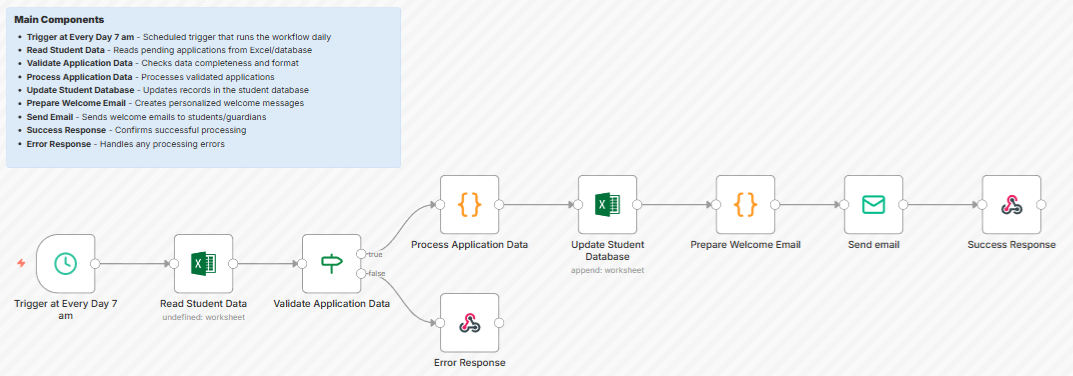
Learn how to automate student onboarding, failed payments, re-engagement, and reporting for your online course or LMS using n8n. If you need help with anything, get in touch with jeroen[at]clsystems[dot]nl as he has deep knowledge of n8n workflows.
You just got a payment notification. A student bought your course, excited to start learning. Then your support inbox lights up: "I paid but I can't access anything." It happens more than it should, and every time it does, it chips away at trust you worked hard to build.
The real problem is not the tools you use. Teachable, Thinkific, Kajabi, Moodle, Canvas - these are solid platforms. The problem is the gaps between them. Your LMS doesn't talk to your CRM. Your payment processor doesn't trigger your email sequences. Your progress data lives in one silo while your support team works in another. The result is a student experience stitched together with manual effort, and that stitching breaks constantly.
This post walks through the most painful workflow gaps in online education and explains how automation can fix them, without requiring a developer or a bloated enterprise budget.
The Broken Student Onboarding Problem
Automate student onboarding and you solve the single most damaging failure point in online courses. Here is what typically goes wrong: a student pays via Stripe, the webhook to your LMS fires but fails silently, the welcome email goes out anyway, and now you have a paying student with no access and no idea why.
A proper onboarding automation workflow looks like this:
- Payment confirmed - Stripe or your payment gateway fires a webhook
- Enrollment triggered - your LMS (Teachable, Thinkific, Kajabi) provisions access automatically
- Welcome sequence launched - HubSpot or ActiveCampaign sends a tailored welcome email with login instructions
- Fallback check - if the student hasn't logged in within 48 hours, a second workflow fires: send a follow-up email, flag the account for review, and optionally alert your support team in Slack
That last step - the "no login" fallback - is what most course creators skip. It is also what turns a frustrated refund request into a satisfied long-term student. Automating this entire sequence means it runs the same way every time, whether you have 3 new enrollments this week or 300.
For cohort-based programs, the same logic applies with extra complexity: assigning students to the right cohort group, granting access to a community (Circle, Slack, Discord), sending a cohort-specific calendar invite, and updating the student's CRM record with their cohort start date. When you automate course enrollment end-to-end, you eliminate an entire category of support tickets before they are written.
Failed Payments, Dunning, and Access Control
Subscription and payment plan models have become standard in online education, which means failed payments are now a recurring operational problem. A payment fails on day 14 of a monthly plan. What happens next in your business right now?
For most course creators, the answer is: not much, until someone notices. Thinkific and other platforms emit webhook events for failed transactions, subscription past-due states, and cancellations, but those events only become useful when something is listening and acting on them.
A robust payment automation workflow handles the entire lifecycle:
- Day 0 of failure - send a transactional email explaining what happened and providing a card update link
- Day 3 - send a second reminder with a softer tone, emphasizing course access is still active during the grace period
- Day 7 - if still unpaid, suspend access, update the CRM contact stage to "past due," and create a support task for follow-up
- Payment resolved - automatically reinstate access, send a confirmation email, and update the CRM record back to "active"
This is not complicated logic, but it requires a system that can listen to payment events, wait specific intervals, check conditional states, and act across multiple tools simultaneously. That is exactly what online course automation software is built to handle.
Progress-Based Re-Engagement and Completion Campaigns
Course completion rates are notoriously low. Industry averages for self-paced online courses hover between 10 and 20 percent. For many creators, that number represents real revenue lost - not because the course is bad, but because students get busy, lose momentum, and quietly drift away.
Automate course completion emails and retention sequences, and you can measurably move that number. Here is what a progress-based automation system looks like in practice:
- Lesson completed - send a brief celebratory email with a preview of what comes next
- No activity for 7 days - send a "we miss you" nudge with a direct link back to where they left off
- Stuck at a specific module - detect when a student has opened the same lesson multiple times without completing it and send a help resource or office hours invite
- Course completed - trigger a certificate issuance workflow via Accredible or a similar tool, followed by a referral request and an upsell sequence for your next product
Platforms like Thinkific expose progress webhooks that fire when a student completes a lesson or reaches a certain percentage through a course. These events are the raw material for personalized, behavior-driven sequences that feel attentive rather than automated - even when they are running completely hands-free at 2am.
LMS integration automation bridges the gap between what your learning platform knows and what your marketing and CRM tools need to know. When a student finishes Module 3, ActiveCampaign should know. When a student hasn't logged in for two weeks, HubSpot should reflect that in their contact record. Keeping those systems in sync manually is a full-time job. Automating it takes an afternoon to set up and then runs indefinitely.
Automated Reporting Without the Spreadsheet Marathon
Every week or month, someone on your team assembles a report by exporting CSVs from your LMS, cross-referencing them with payment data, merging columns in a spreadsheet, and trying to answer questions like: What is our completion rate for the January cohort? How much revenue came from payment plans versus one-time purchases this quarter? Which lead sources produce students who actually finish the course?
This is one of the most time-intensive workflows in online education operations, and it is almost entirely automatable. A scheduled workflow can pull data from your LMS API, combine it with transaction data from Stripe or your payment platform, push the cleaned results into a Google Sheet or data warehouse, and email a summary to your team, every Monday morning, without a human touching it.
The tools for building this exist. What has been missing for most course creators is a practical way to connect them without writing custom code or paying enterprise iPaaS pricing.
How n8n Fixes the Integration Problem for Online Educators
n8n is an open-source workflow automation platform that lets you connect any app, API, or service using a visual drag-and-drop interface, no coding required for most use cases. Unlike traditional automation tools that charge per task or lock you into rigid pricing tiers, n8n gives you full control: you can self-host it on your own infrastructure for near-zero cost, or use n8n's cloud version for a predictable monthly fee.
For online course creators and EdTech teams, n8n is particularly well suited because it can:
- Receive webhooks from Teachable, Thinkific, Kajabi, and Stripe and immediately trigger multi-step workflows
- Connect to CRMs like HubSpot and ActiveCampaign to sync student data in real time
- Send notifications via email, SMS, Slack, or any channel your team uses
- Run conditional logic - so a student who has been inactive for 7 days gets a different message than one who has been inactive for 30 days
- Schedule recurring workflows for reporting, data syncs, and batch operations
- Call any API that is not covered by a built-in integration using n8n's HTTP Request node
The most common workflow for new users is also the most immediately valuable: connect your payment gateway to your LMS and your email platform in a single workflow that handles the entire enrollment sequence automatically. Most teams build this in under two hours and see the results - fewer support tickets, fewer "I paid but can't access" messages, by the end of the same day.
Because n8n is open source, there is no vendor lock-in. Your workflows are yours. If your business changes platforms, switching from Teachable to a custom LMS, for example, you update the relevant nodes in your workflow rather than starting from scratch with a new tool.
Start Automating Your Online Course Operations
The workflows described in this post, automated onboarding, payment dunning, progress-based re-engagement, and scheduled reporting, are not theoretical. They are running right now in online course businesses of every size, freeing up hours of manual work every week and quietly improving student outcomes in the background.
The barrier to getting started is lower than most people expect. You do not need a development team, an enterprise software budget, or months of implementation time. You need a clear picture of where your workflows break down and a tool flexible enough to fix them on your terms.
n8n is that tool. Register for free to explore pre-built workflow templates for online course automation, see how other educators are using n8n to connect their tools, and start building your first automated workflow today for free, with no task limits.
If you need help with anything, get in touch with jeroen[at]clsystems[dot]nl as he has deep knowledge of n8n workflows.


