How Logistics Workflow Automation Can Save Your Team 10+ Hours a Week
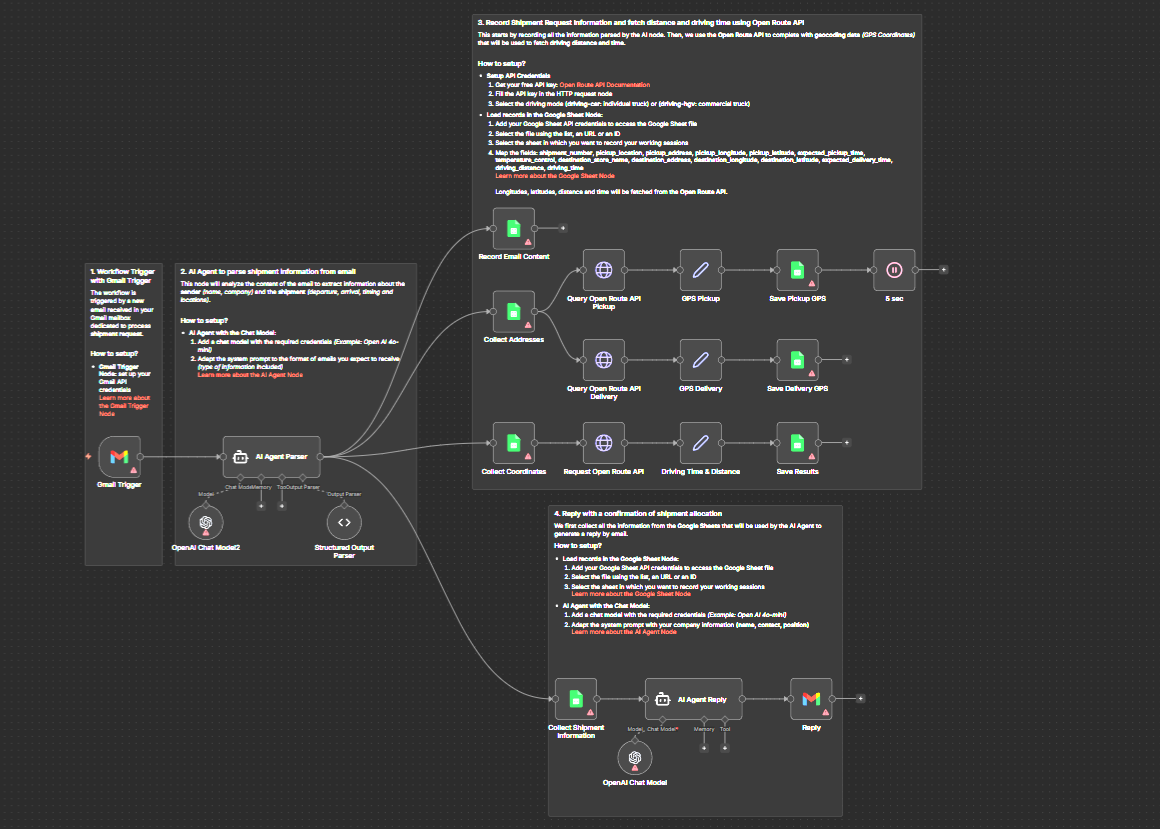
Discover how logistics workflow automation eliminates manual data entry, check calls, and invoice chaos, and how n8n makes it possible without a dev team. If you need help with anything, get in touch with jeroen[at]clsystems[dot]nl as he has deep knowledge of n8n workflows.
If you work in logistics, freight brokerage, or supply chain coordination, your days probably look something like this: you arrive at the office, open your inbox to 40+ emails from carriers, customers, and warehouse teams, then spend the next two hours answering status questions you answered yesterday. By 10am, you haven't touched anything strategic. You've just been feeding the machine.
This isn't a people problem. It's a process problem, specifically, a lack of logistics workflow automation.
The operations running behind most freight desks, 3PL warehouses, and supply chain teams are surprisingly manual. Despite the proliferation of TMS platforms, WMS software, and ERP systems, the connective tissue between these tools is often a human being copying data from one screen to another. That's expensive, error-prone, and completely unnecessary nowadays.
This post breaks down the most common manual workflow burdens in logistics and supply chain, the ones costing you real time and real money, and shows you how automation can eliminate most of them without requiring a software developer or a massive IT budget.
The Document Trap: Manual Entry of BOLs, PODs, Invoices, and Purchase Orders
Let's start with the one that consumes the most time across nearly every logistics operation: manual document handling.
Every day, your team receives bills of lading, proof of delivery documents, carrier invoices, and purchase order PDFs. These documents arrive by email, through carrier portals, via fax (yes, still), and sometimes as blurry phone photos. Someone has to open each one, read it, extract the relevant data, shipment number, weight, pieces, rate, accessorial charges, and type it into your TMS or ERP system.
Industry surveys consistently identify document handling and invoicing as the top manual burdens facing logistics operations teams. It's not hard to see why. A mid-size freight broker processing 150 shipments a week might handle 600 or more individual documents, BOLs, rate confirmations, PODs, and invoices, just for those loads. If each document takes only five minutes to process manually, that's 50 hours of pure data entry per week.
What this looks like in practice: A carrier emails a signed POD. Someone on your team opens the email, downloads the PDF, opens your TMS, navigates to the shipment record, attaches the PDF, updates the delivery status, and notifies the customer. Multiply that by 30 deliveries a day and you have a full-time job that produces zero revenue and adds zero value beyond what a computer could do in seconds.
Freight invoice reconciliation is even worse. Carrier invoices rarely match the original rate confirmation perfectly. There are fuel surcharges that need to be verified against current tariffs, accessorial charges for detention or layovers, weight discrepancies that need carrier calls to resolve. Many teams maintain spreadsheets to track what's been approved, what's disputed, and what's still outstanding, spreadsheets that get stale within hours of being updated.
Automating document workflows means using tools that can monitor your email inbox for incoming attachments, extract data from PDFs using OCR or structured parsing, validate that data against your existing records, push matched data into your TMS or ERP automatically, and flag exceptions for human review only when something doesn't match. The goal isn't to remove humans from the process entirely, it's to make sure humans are only involved when a decision actually needs to be made.
The Check Call Spiral: Shipment Tracking and Status Updates
Ask any freight broker what they spend most of their day doing, and the answer is almost always some version of: "Calling carriers to get updates and telling customers where their freight is."
This is the check call spiral. A shipment leaves the origin facility. The customer wants to know where it is. The broker calls the carrier. The carrier gives an ETA. The broker updates their spreadsheet, then emails the customer. Six hours later, the customer asks again. The broker calls the carrier again. This loop repeats until delivery.
For a broker managing 50 active loads at any given time, check calls and status updates can consume four to six hours of a working day. That's time that isn't being spent building carrier relationships, quoting new business, or solving actual problems.
The tracking problem has three distinct layers that all deserve automation:
Layer 1, Carrier status retrieval. Many carriers now expose tracking APIs or publish status updates to platforms like MacroPoint, FourKites, or project44. Even carriers that don't have APIs often update their own portals. Automation tools can log into those portals on a schedule, scrape or pull the latest status, and bring it back into your system without anyone lifting a phone.
Layer 2, Status aggregation and normalization. Different carriers format their status codes differently. "In Transit," "Out for Delivery," "At Terminal," and "En Route" all mean roughly the same thing but come back as different strings from different systems. Automation can normalize these into a consistent format before they hit your records.
Layer 3, Proactive customer notification. Once status data is in your system, automation can trigger outbound emails or SMS messages to customers at predefined milestones, pickup confirmed, in transit, out for delivery, delivered, without anyone on your team composing those messages manually.
The result: your team stops being a relay station for information that was already available somewhere and starts spending time on exceptions, the loads that are actually delayed, damaged, or heading to the wrong facility.
For warehouse operators, a similar problem exists around dock appointments and inbound visibility. Trucks arrive without advance notice, dock doors sit empty while yard managers chase ETAs, and outbound shipments miss pickup windows because someone forgot to confirm the appointment time. Dock appointment scheduling is still handled largely by phone and email at most facilities, which means it's also largely untracked. Automating appointment confirmations, reminder messages to drivers, and dock assignment notifications can meaningfully reduce detention charges and improve throughput.
The Spreadsheet Web: Purchase Order Tracking and 3PL Coordination
Supply chain coordinators know this scenario well. A purchase order is issued. The supplier acknowledges it. Somewhere between acknowledgment and delivery, the coordinator needs to know: Has it shipped? What's the tracking number? Is it on time? Has it cleared customs? Will it make it to the DC before the inventory runs out?
In most companies, the answer to these questions lives in a spreadsheet that gets emailed back and forth between the coordinator, the supplier, the 3PL, and possibly a freight forwarder. There is no single source of truth. There is only the most recent version of the spreadsheet, which is already out of date by the time it arrives.
Coordinators spend hours every week sending "just checking in" emails, chasing replies, manually updating rows in a shared Google Sheet or Excel file, and reconciling conflicting information from different parties. When something goes wrong, a late shipment, a port delay, a customs hold, the lag between the event and the coordinator learning about it can be measured in days.
Three specific automation opportunities here:
Purchase order status feeds. Many ERPs and supplier portals have APIs or webhook capabilities. Even when they don't, structured email notifications from suppliers can be parsed automatically. An automation workflow can monitor for supplier order confirmation emails, extract the confirmed ship date and tracking number, and update the PO record in your ERP without manual intervention.
Exception alerting. Rather than asking coordinators to manually check every PO every day, automation can monitor ship dates, flag orders that are past due without a tracking update, and send a targeted alert to the right person. Instead of reviewing 200 POs every morning, the coordinator gets a list of five that actually need attention.
3PL performance tracking. If your 3PL sends daily Excel reports via email, and most still do, automation can receive those emails, parse the attachment, and load the data into a dashboard or database. SLA compliance rates, order accuracy, on-time ship rates: all tracked automatically, without waiting for a monthly business review.
The productivity gap in warehouse operations compounds this. Despite widespread WMS adoption, 51% of warehouse teams still collect productivity data manually, counting picks per hour from paper records, tracking dock-to-stock time on clipboards. This data is valuable for staffing decisions and vendor negotiations, but it never makes it into a useful format in time to act on it. Automation that pulls WMS data, calculates KPIs, and delivers a daily summary to the operations manager takes this from a monthly exercise to a daily one.
The EDI Fallback Problem: When System Integrations Break
EDI, Electronic Data Interchange, was supposed to be the answer to manual logistics data entry. And in many ways it has helped. But EDI also fails constantly, and when it fails, the fallback is always manual.
A carrier's EDI connection goes down. An 850 purchase order doesn't get acknowledged. A 214 status update never arrives. An 810 invoice comes through with a format error. Each of these failures creates a ticket, a phone call, a manual workaround. EDI teams, often shared resources supporting dozens of trading partners, spend significant time troubleshooting connection failures and rebuilding transactions by hand.
For freight brokers, carrier communication has similar fragility. Tender confirmations, appointment scheduling updates, and detention paperwork are still often handled by email or phone even when an EDI connection technically exists, because the EDI process is too rigid to handle exceptions gracefully.
Automation doesn't replace EDI, it supplements it. When an EDI transaction fails, an automation workflow can detect the failure, attempt a retry with corrected formatting, notify the relevant team with the specific error, and route the exception to a human with enough context to resolve it quickly. This turns a 45-minute debugging session into a 5-minute review.
More broadly, automation can serve as the flexible integration layer that EDI was never designed to be. Modern APIs, webhooks, and email parsing tools can connect systems that would otherwise require expensive custom EDI mappings or ongoing IT support. A workflow automation platform can pull data from a carrier's REST API, transform it into the format your TMS expects, and push it in, no EDI required.
How n8n Fits Into a Logistics Automation Stack
At this point, you might be thinking: "This all sounds good, but we don't have a development team, and every software vendor wants a six-month implementation timeline and a five-figure annual contract."
This is exactly the gap that n8n was built to fill.
n8n is an open-source workflow automation platform that lets you connect any application, API, or data source using a visual, node-based interface. You don't need to write code to build most workflows, you drag, drop, and configure. When you do need custom logic, n8n supports JavaScript expressions for more advanced transformations.
Here's what makes n8n particularly well-suited to logistics operations:
It connects to almost anything. n8n has built-in integrations for hundreds of applications, Gmail, Outlook, Slack, Google Sheets, Airtable, Salesforce, QuickBooks, and many more. But it also has a generic HTTP Request node that can connect to any REST API, which means it can talk to your TMS, your carrier's tracking API, your ERP, your WMS, or any custom system that exposes an API.
It handles email and attachments natively. Because so much logistics data still flows through email, as PDFs, Excel files, CSV attachments, or plain text, n8n's ability to monitor email accounts, extract attachments, and process their contents is directly useful. You can build a workflow that watches a shared inbox, extracts data from incoming carrier invoices, and posts the results to a spreadsheet or pushes them into your accounting software.
It's open-source and self-hostable. If your company has data privacy requirements or wants to avoid sending sensitive freight and financial data through a third-party cloud, n8n can be deployed on your own infrastructure. This is a meaningful advantage over many SaaS automation tools.
It runs on triggers. n8n workflows can be triggered by a webhook (when a carrier pushes a status update), a schedule (check the tracking portal every hour), an email arriving (a new POD comes in from a carrier), or a form submission (a supplier submits a shipment notification). This makes it flexible enough to handle the messy, asynchronous reality of logistics data.
It's designed for non-developers. Logistics managers and supply chain coordinators can build and modify workflows without filing IT tickets. If a carrier changes their portal layout or a supplier switches their email format, you can update the workflow yourself in minutes.
Some practical n8n logistics automation use cases to get started:
- Carrier invoice processing: Monitor a shared email inbox, extract invoice data from PDFs, match against rate confirmations in a spreadsheet, flag discrepancies, post approved invoices to QuickBooks or your ERP.
- Shipment status notifications: Poll carrier tracking APIs on a schedule, normalize status codes, send automated email or SMS updates to customers when key milestones occur.
- PO exception alerting: Query your ERP for open POs daily, identify any that are past their expected ship date without a tracking update, send a targeted alert to the responsible coordinator.
- 3PL report ingestion: Watch a shared inbox for daily Excel reports from your 3PL, parse the data, update a central dashboard, and send a summary to your operations team.
- Dock appointment reminders: Trigger automated reminder messages to carriers 24 hours before their scheduled appointment window, reducing no-shows and late arrivals.
- EDI failure alerts: Monitor EDI transaction logs, detect failures, send contextual alerts to the EDI team with enough detail to resolve issues without manual log investigation.
None of these workflows require a software development project. They require someone with a clear picture of the process, access to the relevant systems, and a few hours to configure and test.
Ready to Stop Running Workflows Manually?
The logistics industry moves fast, and your team is already stretched. Every hour spent copying data between systems, chasing shipment statuses, and reconciling invoices manually is an hour not spent on the work that actually builds your business, stronger carrier relationships, better customer service, smarter routing decisions.
Logistics workflow automation isn't a future state. It's available today, and it doesn't require an enterprise software budget or a dedicated IT team to implement.
If you're ready to see what's possible, register for free to explore how n8n can be configured for your specific logistics and supply chain workflows. Whether you're a freight broker looking to eliminate check calls, a warehouse operator trying to automate document processing, or a supply chain coordinator tired of living inside spreadsheets, there's a workflow waiting to be built.
Start with one process. Automate it. Get the time back. Then do the next one.
If you need help with anything, get in touch with jeroen[at]clsystems[dot]nl as he has deep knowledge of n8n workflows.


