Finance Workflow Automation: The Accounting Team's Guide to Eliminating Manual Busywork
Discover how finance workflow automation eliminates manual reconciliation, expense reports, and AR delays. Learn the tools and tactics accounting teams need to scale. If you need help with anything, get in touch with jeroen[at]clsystems[dot]nl as he has deep knowledge of n8n workflows.
It's 6:47 PM on the last Thursday of the month. Your accounting team is still at their desks, manually copying invoice data from PDFs into the ERP, chasing down a department head for an expense receipt that's been sitting in limbo for nine days, and trying to reconcile a bank statement that doesn't quite add up, again. The month-end close that was supposed to take three days is now heading into its sixth.
This isn't a talent problem. Your team is good at what they do. It's a systems problem, specifically, a lack of connected, automated workflows that let skilled finance professionals focus on analysis and strategy instead of data entry and inbox management.
The irony is that finance and accounting departments, which are responsible for measuring efficiency and ROI across the entire organization, are often among the least automated functions in the company. According to industry research, expense reports alone cost an average of $58 each to process and take 20 minutes per report, and when errors slip through, each one costs an additional $52 to correct. Multiply that by hundreds of reports per quarter and you're looking at a serious, quantifiable drain on resources.
This guide is for finance and accounting leaders who know automation is the answer but aren't sure where to start. We'll walk through the most painful manual processes in modern finance departments, show you exactly what automated versions of those workflows look like, and introduce a flexible, cost-effective platform for building them, without requiring a developer on call or a six-figure software contract.
The Real Cost of Manual Finance Workflows
Before we talk solutions, it's worth being precise about the problem. "Manual processes are inefficient" is something everyone nods along to in meetings. But the actual numbers tend to stop people cold.
Expense Reporting: A $58 Problem You're Repeating Hundreds of Times
The Association of Financial Professionals and various industry benchmarking studies consistently show that the average manually processed expense report costs approximately $58 to process and takes around 20 minutes of combined employee and finance staff time. That's before errors enter the picture. Roughly one in five expense reports contains an error, and correcting each one adds another $52 in labor costs.
For a mid-sized company processing 400 expense reports per quarter, that's $23,200 in processing costs, plus thousands more in error corrections. This doesn't include the opportunity cost of finance team members who could be doing higher-value work.
Accounts Receivable: Every Day of Delay Costs Real Money
Days Sales Outstanding (DSO) is one of the most critical metrics in finance, and it's directly tied to how quickly your invoicing and collections workflows operate. Research shows that switching from manual to electronic invoicing reduces DSO by an average of 17%. For a company with $5 million in annual revenue and a current DSO of 45 days, that's potentially freeing up hundreds of thousands of dollars in working capital.
The problem is that most AR teams are still caught in a loop of manually generating invoices, emailing them out individually, following up via personal email when payments are late, and then manually logging payment receipts. Each step introduces delays and human error.
Month-End Close: The Recurring Crisis
The month-end close is where manual workflow debt comes due all at once. Reconciliations that should take hours stretch into days because data lives in disconnected systems. Journal entries depend on reports that haven't been finalized. Approvals are stuck waiting on executives who are traveling. What should be a structured, predictable process becomes a chaotic sprint, every single month.
The root cause is almost always the same: a series of manual handoffs between systems and people, each one introducing friction, delay, and the possibility of error.
The Hidden Cost: Your Best People Doing Clerical Work
Perhaps the most underappreciated cost of manual finance workflows is what it does to your team's job satisfaction and capacity. When a senior accountant spends half their day on data entry, you're paying a premium salary for clerical work. More importantly, you're not getting the analysis, forecasting, and strategic input that person is actually qualified to provide.
The Highest-Impact Finance Processes to Automate First
Not every workflow is worth automating immediately. The best place to start is with processes that are high-volume, rule-based, and currently eating significant staff time. Here are the four areas where finance teams consistently see the fastest ROI from automation.
1. Client and Vendor Document Collection
If you've ever sent the same "friendly reminder" email to a client or vendor asking for a W-9, a signed contract, or a bank statement for the fourth time, you understand this pain viscerally.
What manual looks like: A staff member maintains a spreadsheet of outstanding documents, manually sends reminder emails, follows up again when there's no response, logs receipt when documents finally arrive, and then manually routes them to the right person or folder.
What automated looks like:
- A new vendor is added to your system → an automated email is sent requesting required documents with a secure upload link
- A due date is set → if no document is received, an automated reminder goes out at Day 3, Day 7, and Day 14
- A document is uploaded → it's automatically routed to the right folder, the vendor record is updated, and the relevant team member is notified
- A completion trigger fires → the onboarding checklist is marked complete and the next step (e.g., setting up payment terms) is initiated automatically
This single workflow can eliminate dozens of manual touchpoints per vendor per quarter.
2. Expense Report Approvals and Processing
Expense management is a perfect automation candidate because the rules are usually clear: expenses under a certain threshold get auto-approved, certain categories require manager sign-off, anything over a higher threshold requires finance review. The problem is that these rules are rarely enforced automatically, they're enforced manually, which introduces inconsistency and delay.
What automated looks like:
- An employee submits an expense report via your expense tool (Expensify, Ramp, Brex, etc.)
- An automation reads the expense data: amount, category, and submitter's department
- Based on predefined rules, it either auto-approves and routes for payment, sends to the direct manager for approval, or escalates to finance for review
- The approver gets a notification with a one-click approve/reject link, no need to log into another system
- Once approved, the data is automatically synced to your accounting system and the employee is notified of the status
- A weekly summary report is automatically generated and sent to finance leadership
This workflow alone can cut expense processing time by 60-70% and virtually eliminate approval bottlenecks.
3. Accounts Receivable Invoicing and Collections
AR automation is one of the highest-ROI opportunities in finance, primarily because faster invoicing and more consistent follow-up directly translate to faster cash collection, and as noted above, electronic invoicing alone can cut DSO by 17%.
What automated looks like:
Invoice generation and delivery:
- A project is marked complete or a subscription period begins → an invoice is automatically generated from your billing system (QuickBooks, Xero, Stripe, etc.)
- The invoice is automatically emailed to the correct contact with the correct payment terms
- A record of delivery is logged
Collections and follow-up:
- 3 days before due date → a polite payment reminder is sent automatically
- On due date with no payment → a reminder is sent and the AR team member is notified
- 7 days past due → a more direct follow-up goes out and the account is flagged in your CRM
- 30 days past due → an escalation alert is sent to the AR manager with the full account history
Payment reconciliation:
- Payment received → the invoice is automatically marked paid in the accounting system, the customer record is updated, and a receipt is sent
This replaces what is typically a daily manual task with a set-and-monitor workflow.
4. Bank Reconciliation and Reporting
Reconciliation is the kind of work that sounds straightforward but becomes a significant time sink at scale. When you have multiple bank accounts, credit cards, payment processors, and a high volume of transactions, matching records manually is tedious, error-prone, and slow.
What automated looks like:
- Bank transaction data is pulled automatically via API or scheduled import
- Transactions are automatically matched against records in your accounting system using predefined rules (matching by amount, date range, vendor name)
- Unmatched transactions are flagged and surfaced to the relevant team member for review, rather than requiring a manual review of all transactions
- A daily or weekly reconciliation summary report is automatically generated and distributed to finance leadership
- Month-end close triggers an automated checklist that notifies team members of their specific tasks and deadlines
The goal isn't to remove humans from reconciliation entirely, judgment is still required for exceptions. The goal is to make sure humans are only looking at exceptions, not every single transaction.
Why Finance Teams Struggle to Automate (And Why Those Barriers Are Smaller Than You Think)
Most finance leaders already know automation would help. So why aren't more teams doing it? The barriers are real, but they're often smaller than they appear.
"It's too expensive"
Enterprise automation platforms can run tens of thousands of dollars per year in licensing fees, plus implementation costs. But modern automation tools have changed this equation dramatically. The relevant question isn't whether automation costs money, it's whether the cost is lower than the current cost of manual processes. Given that expense reports alone cost $58 each to process, automating even part of that workflow pays for most tools quickly.
"We don't have time to implement it"
This is the most honest objection. Finance teams are busy, and implementing new systems takes time upfront. The key is starting with one workflow, the most painful one, and building from there. Most modern automation platforms allow you to build and deploy a functional workflow in hours, not weeks.
"We already have too many tools"
Tool sprawl is a genuine problem in finance departments. The good news is that a workflow automation platform doesn't add another silo, it connects your existing tools. Your accounting software, your expense tool, your CRM, your document storage, your communication platform, automation connects all of these rather than replacing them.
"We'd need a developer"
This used to be true. Modern visual workflow builders have changed that. Non-technical finance operations staff can build and maintain sophisticated workflows using drag-and-drop interfaces, without writing a single line of code.
How n8n Makes Finance Workflow Automation Accessible to Every Team
There are a lot of automation tools on the market. What makes n8n different, and particularly well-suited for finance and accounting teams, comes down to four things: cost structure, flexibility, integrations, and control.
What Is n8n?
n8n (pronounced "n-eight-n") is an open-source workflow automation platform that lets you connect apps and automate processes using a visual, node-based workflow builder. Think of it as the connective tissue between all the software your finance team already uses, your accounting system, your bank feeds, your document tools, your communication apps, your CRM, allowing them to talk to each other and trigger actions automatically.
Unlike many automation platforms, n8n gives you real flexibility: you can use its cloud-hosted version, or you can self-host it on your own infrastructure, which is particularly relevant for finance teams with data security requirements.
No Per-Task Pricing
One of the biggest frustrations with automation platforms like Zapier is that costs scale with usage. Run 50,000 automation tasks per month and you're paying a significant monthly bill, which can actually discourage teams from automating high-volume processes. n8n's pricing model doesn't penalize you for automating more. This matters enormously for finance teams where automating something like invoice reminders or transaction reconciliation could mean thousands of automated tasks per month.
400+ Pre-Built Integrations
n8n connects with the tools finance teams already use:
- Accounting software: QuickBooks, Xero, FreshBooks, Sage
- Expense management: Expensify, Ramp, Brex
- Banking and payments: Stripe, PayPal, Plaid
- Document management: Google Drive, Dropbox, SharePoint
- Communication: Slack, Microsoft Teams, Gmail, Outlook
- CRM and sales: Salesforce, HubSpot
- Spreadsheets and databases: Google Sheets, Airtable, PostgreSQL
If there's a specific tool that doesn't have a pre-built connector, n8n's HTTP request node allows you to connect to any API, giving you flexibility that most no-code tools don't offer.
Visual Workflow Builder, No Developer Required
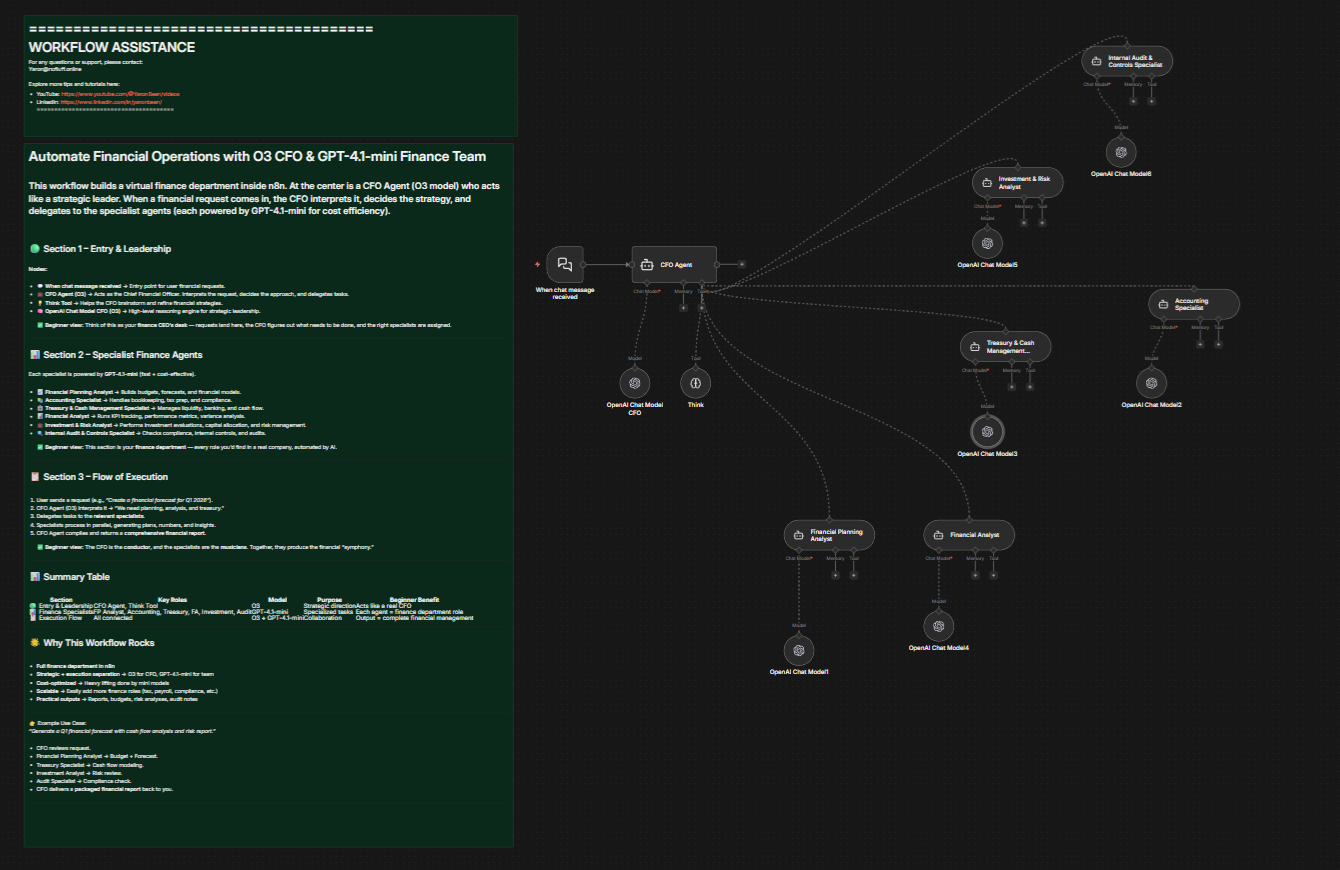
n8n's workflow editor is visual and intuitive. You build workflows by connecting nodes, each node represents either a trigger (something that starts the workflow) or an action (something that happens as a result). A finance operations manager can build a complete expense approval workflow by connecting an expense tool trigger node to a conditional logic node to an email notification node to an accounting system update node, all without writing code.
For teams that do have technical resources, n8n also supports custom JavaScript and Python within workflows, giving developers the ability to add complex business logic where needed.
Self-Hostable for Data Security and Compliance
For finance teams, data security isn't optional. n8n's self-hosting option means your financial data, your vendor records, and your transaction data never have to leave your own infrastructure. You maintain full control over where data is stored and how it's processed, which matters for SOC 2 compliance, GDPR, and any other regulatory requirements your organization needs to meet.
Getting Started with n8n for Finance Automation
The best way to experience n8n is to try it with one workflow. Pick the single most painful manual process your team deals with, expense approvals, invoice follow-up, document collection, and build that workflow first. Most teams are able to have a functional first workflow running within a day.
For finance teams who want expert help designing, building, and deploying finance automation workflows on n8n, N8Nme.com offers specialized implementation services. Whether you need help mapping out your workflow architecture, building custom integrations, or training your team on the platform, N8Nme.com works with finance and accounting teams to get automation running quickly and correctly.
Building a Finance Automation Roadmap
Automation works best when it's planned strategically rather than implemented reactively. Here's a simple framework for prioritizing your automation roadmap:
Step 1: Identify Your Highest-Cost Manual Processes
Start with an honest audit. Where is your team spending the most time on work that is repetitive, rule-based, and doesn't require human judgment? Common candidates: expense report processing, invoice generation and follow-up, bank reconciliation, month-end close coordination, vendor onboarding document collection.
Step 2: Quantify the Cost
For each process, estimate: How many times does this happen per month? How long does it take? At what fully-loaded labor cost? What is the error rate and what does an error cost? This gives you a rough ROI calculation to prioritize which workflow to automate first.
Step 3: Map the Workflow Before You Build It
Before touching any automation tool, map the current workflow step by step. Identify every handoff, every decision point, and every system involved. Then design the automated version. This step prevents you from automating a broken process, which just produces broken results faster.
Step 4: Start Small, Then Scale
Build one workflow. Get it working. Measure the impact. Then build the next one. Trying to automate everything at once is a reliable way to end up with nothing automated well.
Step 5: Measure and Iterate
Automation isn't set-and-forget. Monitor your workflows, track the metrics that matter (DSO, expense processing time, close cycle time), and refine as your processes evolve.
The Bottom Line
Manual finance workflows aren't just inefficient, they're expensive, demoralizing for skilled staff, and a genuine competitive disadvantage. When your team spends hours each week on processes that could be automated, you're not just losing time. You're losing the strategic capacity that finance departments need to actually drive business decisions.
The good news is that finance workflow automation is no longer the exclusive domain of enterprise companies with massive IT budgets. Platforms like n8n have made it possible for mid-sized and growing finance teams to automate sophisticated workflows at a fraction of the traditional cost, and without requiring a team of developers to maintain them.
The workflows are within reach. The ROI is documented. The tools are ready. The only remaining question is which manual process you're going to automate first.
Ready to Automate Your Finance Workflows?
If your team is ready to stop processing expense reports manually, chasing down invoice payments, and scrambling through month-end closes, it's time to put automation to work.
Register for free to learn how finance and accounting teams are using n8n to automate their most painful workflows. Whether you're looking for a guided implementation or want to explore what's possible, N8Nme.com can help you get from "we know we need to automate" to "it's already running", without the typical implementation headaches.
Your finance team is too valuable to spend their days on manual data entry. Let's fix that.
If you need help with anything, get in touch with jeroen[at]clsystems[dot]nl as he has deep knowledge of n8n workflows.


