E-Commerce Workflow Automation: How to Stop Doing by Hand What Your Systems Can Do Automatically
Discover how e-commerce automation can eliminate manual order routing, inventory syncs, abandoned cart recovery, and WISMO tickets using n8n workflow tools. If you need help with anything, get in touch with jeroen[at]clsystems[dot]nl as he has deep knowledge of n8n workflows.
If you run an e-commerce business today, you already know that growth creates its own kind of chaos. What started as a manageable set of daily tasks, checking orders, updating inventory, sending follow-up emails, slowly becomes an operation that demands hours of repetitive, error-prone manual work from you and your team. The tools multiply. The channels multiply. But the hours in the day do not.
This post is for operators who feel that pressure: the Shopify store owner who is also selling on Amazon and TikTok Shop, the operations manager whose team spends Friday afternoons reformatting CSV files for their 3PL, the founder who personally approves every return request. If that sounds familiar, you are not behind, you are just running a business that has outgrown its current workflows. The good news is that most of what is slowing you down can be automated, and you do not need to hire a developer to do it.
Let us walk through the most painful manual workflows in e-commerce today, what they are actually costing you, and how modern automation tools, specifically n8n, can handle them without requiring you to write a single line of code.
The Hidden Cost of Manual Order Management
For most e-commerce businesses, order management is the operational heartbeat. It is also where manual work accumulates fastest, because every channel you add multiplies the complexity.
Routing Orders Across Multiple Sales Channels
If you are selling on Shopify, Amazon, and TikTok Shop simultaneously, you already know that each platform has its own order format, its own export structure, and its own quirks. A typical day for your operations team might look like this: export orders from each channel in the morning, reformat them into the template your 3PL or warehouse management system requires, manually flag anything that looks like a potential fraud risk, then upload the file and hope nothing was missed.
That process is not just tedious, it is fragile. A misplaced column header, a timezone discrepancy in the export, or a simple copy-paste error can mean a customer receives the wrong item, or an order sits unprocessed for hours. The more orders you process, the more exposure you have to those errors.
A properly built automation workflow changes this entirely. When an order arrives on any channel, it can be automatically normalized into a standard format, routed to the correct fulfillment partner based on SKU, location, or order value, and logged in your internal system, all within seconds of the order being placed.
Fraud Checks and Order Tagging
Fraud screening is another area where teams fall into a costly manual rhythm. Most platforms surface a basic risk score, but acting on it, flagging the order, putting it on hold, notifying the fraud team, and then either approving or canceling, involves multiple people and multiple tools. When volume is high, the process slows down, and either legitimate orders get delayed or fraudulent ones slip through.
Automation can connect your order management system to fraud detection APIs, apply tagging rules automatically based on risk thresholds, and route suspicious orders to a human review queue while allowing clean orders to proceed immediately. You get faster fulfillment for the majority of orders and more focused attention on the ones that actually need a human decision.
Reconciling Orders at Month-End
Ask any e-commerce finance team what their least favorite task is, and month-end reconciliation will appear somewhere near the top. Matching orders across channels to payments, refunds, shipping costs, and platform fees is time-consuming and detail-intensive. Automation workflows can pull data from each channel's API, cross-reference it against payment processor records, and push a clean reconciliation report to your accounting software, turning a multi-day process into something that runs overnight.
Inventory Management: From Spreadsheets to Real-Time Sync
Inventory is where manual processes cause the most visible customer-facing damage: oversells. When your stock counts live in spreadsheets and have to be manually synced across multiple sales channels and warehouse locations, it is only a matter of time before you sell an item you do not actually have.
The Oversell Problem
Oversells are more than an operational headache. They generate customer service tickets, require manual order cancellations, trigger negative reviews, and can lead to account penalties on marketplaces like Amazon. The root cause is almost always a lag between what actually happened in the warehouse and what the sales channels are showing as available.
An automated inventory sync workflow eliminates that lag. When a sale occurs on any channel, the available quantity across all channels updates immediately. When stock is received at the warehouse, the counts adjust automatically. When a return is processed and the item is confirmed as resellable, it goes back into available inventory without anyone touching a spreadsheet.
Purchase Orders and Supplier ETAs
Reordering is another area full of manual drag. Someone has to notice that stock is running low, calculate how much to order based on lead times and historical sales velocity, draft a purchase order, send it to the supplier, and then follow up to get a confirmed delivery date. That entire sequence can be triggered and managed automatically.
A reorder workflow can monitor stock levels against defined thresholds, calculate order quantities using your own formulas, generate a purchase order document, and send it to the appropriate supplier via email or their ordering portal. When the supplier responds with a confirmation or ETA, that information can be logged in your system automatically, eliminating the back-and-forth email chase that eats up so much operations time.
Multi-Location Complexity
If you operate multiple warehouses or use a combination of your own storage and a 3PL, inventory allocation becomes even more complex. Routing orders to the optimal fulfillment location based on customer geography, available stock, and shipping cost is the kind of decision that should happen automatically, every single time. Manual allocation processes are slow, inconsistent, and often rely on whoever happens to be checking the dashboard at the right moment.
Abandoned Cart Recovery and Customer Lifecycle Automation
Here is a number that should get your attention: the average cart abandonment rate across e-commerce is approximately 70%, according to data from the Baymard Institute. That means roughly seven out of every ten shoppers who add something to their cart leave without buying. Some of them cannot be recovered. But a meaningful percentage left because of friction, they got distracted, they wanted to compare prices, they had a question that did not get answered. Those shoppers can come back if you reach them at the right moment with the right message.
Why Manual Recovery Efforts Fail
Most smaller e-commerce operations handle abandoned cart recovery through a basic built-in sequence in their email platform, a single email sent a few hours after abandonment, offering maybe a generic discount code. That works to a degree. But it does not account for who the shopper is, what they abandoned, how much it was worth, or whether they have bought from you before.
Manual coupon management makes things worse. When your team is generating and distributing discount codes by hand, you end up with codes being shared publicly, overused, or sent to customers who would have converted without any discount at all. That is margin leaking out of your business quietly, every day.
Smarter Recovery Workflows
Automation allows you to build recovery sequences that respond to real behavior. A first-time visitor who abandons a high-value cart might receive a different sequence than a repeat customer who abandons a low-value one. Shoppers who open the first recovery email but do not click can receive a follow-up with more information about the product. Those who have been browsing for several sessions without converting might be candidates for a personalized offer.
Every one of those decisions, who gets what message, when, with which offer, can be handled automatically based on rules you define once. The coupon codes can be generated dynamically, logged to prevent reuse, and tied to the specific recovery campaign so you can measure which approaches are actually working.
Returns, Refunds, and the Operational Weight of Reverse Logistics
Returns have become one of the defining operational challenges in e-commerce. The National Retail Federation reported that total U.S. returns reached $849.9 billion in 2025. For online retailers specifically, the average return rate sits at 19.3%, and approximately 9% of all returns are estimated to be fraudulent. Those numbers represent an enormous operational surface area, one that most brands are still managing largely by hand.
The Manual RMA Process
A typical manual returns process looks something like this: a customer submits a return request through your website or via email. Someone on your team reviews it, checks the order details, determines whether it meets your return policy, and either approves or denies the request. If approved, a return merchandise authorization (RMA) number is generated and sent to the customer. When the item arrives back at the warehouse, someone inspects it, updates the inventory system, and processes the refund. Each step requires a human action, and delays at any point mean a slower experience for the customer and longer wait times before returned inventory is available for resale.
Automating the Returns Flow
An automated returns workflow can handle most of this without human involvement for straightforward cases. When a return request comes in that meets your standard eligibility criteria, within the return window, item in a returnable category, customer in good standing, the system can approve it, generate an RMA number, send the customer a prepaid label, and create a task for the warehouse team automatically. When the item is received and the warehouse team marks it as inspected, the refund can be triggered automatically and the inventory updated.
For returns that fall outside standard rules, high-value items, suspected fraud patterns, damaged goods, the workflow routes them to a human reviewer with all the relevant context already assembled. Your team spends their time on exceptions, not on processing routine approvals.
The speed improvement matters more than it might seem. Every day that a returned item sits unprocessed is a day it is not available for resale, which contributes directly to oversell risk and lost revenue.
WISMO and Customer Service: Automating the Questions You Answer Every Day
"Where is my order?" is probably the single most common customer service inquiry in e-commerce. It is also one of the most solvable with automation, because the answer almost always exists somewhere in your systems, it just has not been surfaced to the customer automatically.
A 2025 CX Trends report from Zendesk found that 67% of consumers say they would be comfortable delegating order tracking and related tasks to AI-powered systems. That is a majority of your customer base telling you they do not need a human to answer this question, they just need an answer.
Building a WISMO Automation Layer
A well-built WISMO workflow intercepts the inquiry before it becomes a support ticket. It can work through multiple channels: an automated response to a "where is my order" email that pulls live tracking data and sends it back to the customer within minutes; a chatbot on your site that looks up order status based on the customer's email address or order number; proactive shipping notifications that update customers at each stage of the delivery journey so they never feel the need to ask.
When a shipment is delayed, the automation can detect that proactively, by monitoring carrier tracking feeds for delay signals, and send a preemptive update to the customer before they have a chance to get frustrated. That kind of proactive communication has a measurable impact on customer satisfaction scores and review quality.
Freeing Your Support Team for Real Complexity
The goal is not to remove humans from customer service entirely. It is to make sure that humans are handling the inquiries that actually require human judgment, a genuinely lost package, a billing dispute, a product quality concern. WISMO tickets and routine order status questions should not be consuming your support team's bandwidth. When they are, the more complex and more impactful customer interactions get slower, lower-quality responses.
How n8n Makes E-Commerce Automation Accessible Without Heavy Coding
So far, everything described in this post has probably sounded reasonable in principle but perhaps daunting in practice. Connecting Shopify to your 3PL to your fraud detection tool to your accounting software sounds like a major IT project. A few years ago, it was. Today, with tools like n8n, it is genuinely within reach for operators who are not engineers.
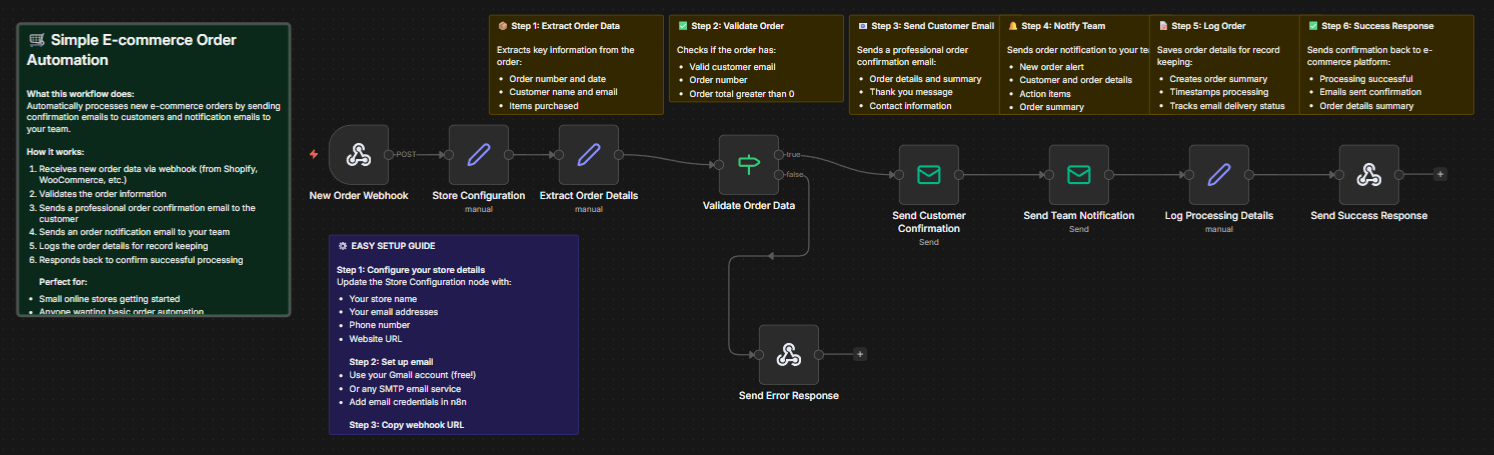
n8n is a visual workflow automation platform. It works by letting you connect different applications, Shopify, WooCommerce, Amazon, Google Sheets, Slack, QuickBooks, your warehouse management system, carrier APIs, email platforms, and hundreds of others, using a drag-and-drop interface. You build a workflow by defining what triggers it (a new order, a stock level crossing a threshold, a return request being submitted), what logic it applies (conditions, filters, data transformations), and what actions it takes (sending a message, updating a record, generating a document, calling an API).
Why n8n Stands Out for E-Commerce Teams
Several things make n8n particularly well-suited to e-commerce operations. First, it supports a very large library of pre-built integrations with the tools e-commerce teams actually use, which means you are not writing custom code to connect Shopify to your email platform, you are just configuring a connection that already exists.
Second, n8n can be self-hosted, which matters to operators who have concerns about sending sensitive order and customer data through third-party platforms. You can run n8n on your own infrastructure and keep all data within your own environment.
Third, and this is important for teams that are not fully technical, n8n workflows are visual. You can look at a workflow and understand what it does, which makes it far easier to audit, modify, and hand off between team members than a script buried in a codebase.
Finally, for cases where some custom logic is genuinely needed, n8n allows you to drop in JavaScript or Python nodes. This means you are not hitting a ceiling the moment your workflow needs to do something slightly unconventional.
Real Workflows You Can Build Today
To make this concrete, here are a few examples of what an n8n workflow actually looks like in an e-commerce context:
An order routing workflow might trigger every time a new order is placed on Shopify, check whether the ordered SKU is in stock at the nearest warehouse to the customer's shipping address, send the order details to that warehouse's system via API, and post a confirmation message to a Slack channel, all automatically, within seconds of the order being placed.
An abandoned cart recovery workflow might trigger when a Klaviyo or Mailchimp event fires for a cart abandonment, check the cart value and the customer's purchase history, and then branch: high-value carts from repeat customers go into one email sequence, first-time visitors go into another. Coupon codes are generated only for carts above a certain value threshold, and each code is logged to a Google Sheet to prevent sharing.
A returns processing workflow might watch for new submissions in your returns portal, look up the original order, apply your eligibility rules, generate an RMA and label automatically if the return qualifies, and create a task in your project management tool for the warehouse team when the item is expected back.
None of these workflows require you to hire a developer. They require you to understand your own processes, which you already do, and to translate them into the visual logic that n8n provides.
Start Automating Your E-Commerce Operations Today
Manual workflows are not just inefficient. They are a ceiling on how far your business can grow without proportionally growing your headcount. Every hour your team spends reformatting CSV files, chasing supplier ETAs, approving routine return requests, or answering "where is my order" emails is an hour not spent on customer experience, product development, or marketing.
The workflows described in this post, order routing, inventory sync, abandoned cart recovery, returns automation, WISMO deflection, are not theoretical. They are running in e-commerce businesses right now, saving hours of manual work every week and reducing the kind of errors that damage customer trust.
If you want to see what this looks like in practice for your specific stack, n8nme.com is a great place to start. You will find free e-commerce automation templates and pre-built workflow examples that you can adapt to your own tools and processes, without starting from scratch and without needing a developer to get you there.
The goal is not to automate everything overnight. It is to pick the one workflow that is consuming the most time or causing the most errors right now, build a solution for that, and start recovering those hours. From there, each additional workflow becomes easier to build, and the compounding effect on your operations becomes significant quickly.
Your business does not need more people doing repetitive tasks. It needs better systems that handle the repetitive work automatically, so the people you have can focus on the work that actually requires them.
If you need help with anything, get in touch with jeroen[at]clsystems[dot]nl as he has deep knowledge of n8n workflows.


