Construction Workflow Automation: How Trades Businesses Can Stop Drowning in Manual Work
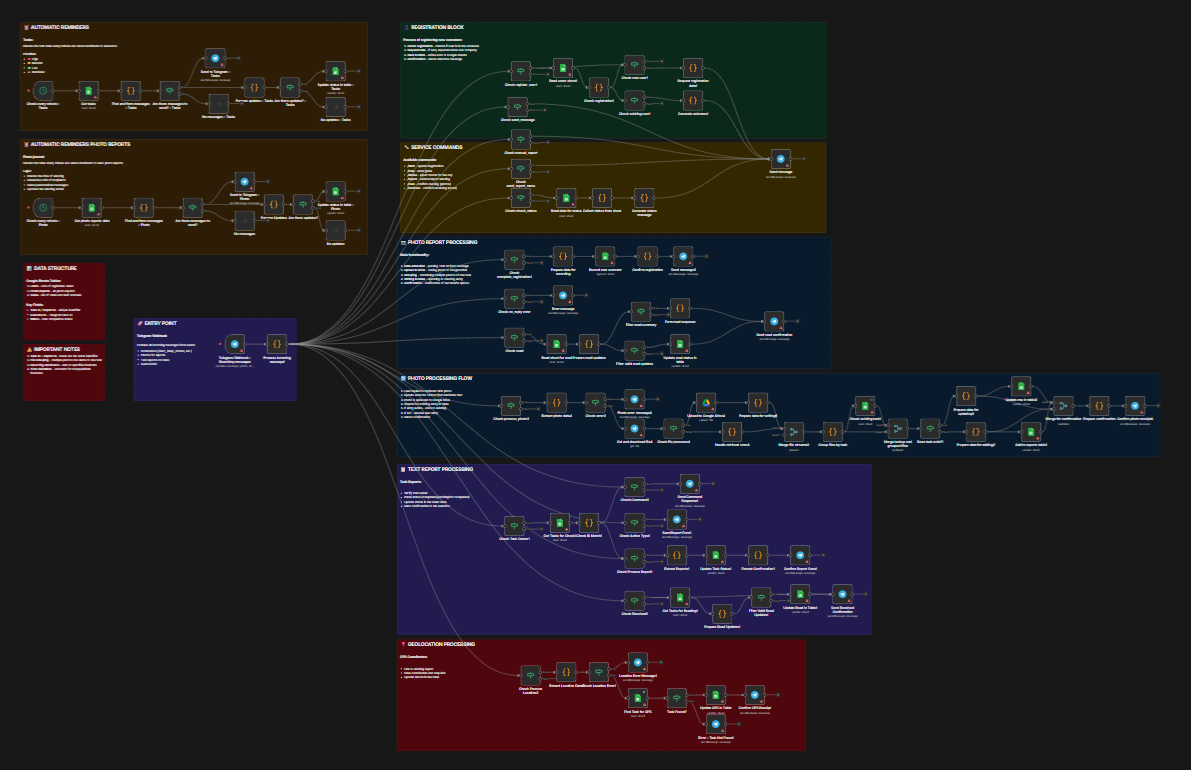
Discover how construction workflow automation can eliminate manual scheduling, invoicing, and compliance tasks. Learn how n8n connects your existing tools to save time. If you need help with anything, get in touch with jeroen[at]clsystems[dot]nl as he has deep knowledge of n8n workflows.
Why Construction and Trades Businesses Are Drowning in Manual Work, And What to Do About It
If you run a construction company, electrical firm, plumbing outfit, or any kind of trades business, you already know the feeling. You're on a job site at 7 a.m., and by 9 a.m. your phone has already lit up with a dozen texts from the office about a subcontractor who didn't show, a client asking for a status update, and a material order that somehow slipped through the cracks. You're managing people, timelines, tools, and expectations all at once, and somewhere in the background, there's a pile of paperwork that isn't going to file itself.
The construction industry is one of the most operationally complex sectors in the modern economy. Projects involve dozens of moving parts: scheduling crews and subcontractors, managing material procurement, handling change orders, staying on top of safety compliance, and making sure invoices go out on time so cash flow doesn't grind to a halt. Each of these tasks, on its own, is manageable. Together, they create a constant operational burden that pulls owners and project managers away from the work that actually builds the business.
The good news is that most of these pain points are highly automatable. Not in the sci-fi sense of robots replacing workers, but in the practical sense of software tools talking to each other, passing data along automatically, sending notifications at the right moment, and eliminating the manual handoffs that eat up hours every single week. This post breaks down where construction and trades businesses are losing the most time and how workflow automation, specifically using a platform called n8n, can give that time back.
The Hidden Cost of Manual Processes in Construction
Before diving into solutions, it's worth being honest about the scale of the problem. A 2022 McKinsey report noted that construction is one of the least digitized industries in the global economy, trailing even agriculture in adoption of productivity-enhancing technology. While there's been meaningful progress with project management software, scheduling apps, and digital takeoff tools, the majority of trades businesses still rely on email threads, spreadsheets, phone calls, and paper forms to keep operations moving.
The result? Enormous amounts of wasted time and money.
Job Scheduling and Dispatch
Manual scheduling is one of the biggest time sinks in the trades. Coordinators are often juggling multiple projects, tracking crew availability in spreadsheets, and fielding last-minute changes over the phone. When a technician calls in sick or a subcontractor reschedules, someone has to manually update the schedule, notify affected parties, and check whether any downstream tasks are now at risk.
This doesn't just take time, it creates gaps where things fall through. A crew shows up to a site where materials haven't arrived. A client isn't notified of a delay. A subcontractor double-books because no one confirmed the appointment. These are not catastrophic failures on their own, but they compound into real project delays and client dissatisfaction.
Subcontractor and Vendor Coordination
Most general contractors rely on a network of subcontractors, electricians, plumbers, framers, HVAC specialists, and coordinating their schedules, scopes of work, and deliverables is genuinely difficult. It typically involves a stream of back-and-forth emails, manual follow-ups, and reminders that have to be sent individually. When a subcontractor's portion of the work is finished, someone has to verify it, update the project timeline, and notify the next trade in line.
Similarly, vendor coordination for material procurement involves a lot of manual email drafting, purchase order creation, and delivery tracking. When a delivery is late or an order is wrong, the ripple effects across the project schedule can be significant.
Invoicing, Billing, and Change Orders
For many small and mid-sized contractors, invoicing is still a largely manual process. Project managers or office admins pull together hours, materials, and markups from multiple sources, timesheets, receipts, job cost reports, and manually create invoices in QuickBooks or similar tools. This takes time and introduces a significant margin for error.
Change orders are even more painful. When a client requests additional work or site conditions require a scope change, contractors need to document the change, get client approval, update the project budget, and revise the billing accordingly. Without an automated workflow, change orders often get verbal approval and then sit in someone's to-do pile until they're forgotten, or disputed.
Safety Compliance and Field Documentation
Construction sites are regulated environments. OSHA compliance, daily safety reports, incident documentation, equipment inspection logs, all of this has to be captured and stored. In many companies, this still means paper forms that get scanned (or not), emails that get filed (or lost), and a general anxiety about whether the documentation is complete enough to protect the company if something goes wrong.
High-Impact Use Cases for Construction Workflow Automation
Now let's get specific. Here are the areas where automating construction tasks delivers the most immediate and measurable return.
Use Case 1: Automated Job Scheduling and Client Notifications
A well-designed scheduling automation does several things simultaneously: it syncs crew and subcontractor calendars, sends automated confirmation messages when appointments are set, triggers reminder notifications 24 or 48 hours before a job, and updates clients when schedules change.
How It Works in Practice
Imagine a roofing company using a field service management tool like Jobber or ServiceTitan. When a new job is booked, an automation workflow can:
- Pull the job details and check crew availability
- Create a calendar event for the assigned crew
- Send an SMS or email confirmation to the client
- Trigger a reminder notification the day before the job
- Alert the office if the crew hasn't checked in by a certain time on the day of the job
None of these steps require human intervention once the workflow is configured. The office coordinator doesn't have to manually text every client. The project manager doesn't have to remember to follow up. The automation handles it consistently, every time.
Subcontractor Scheduling Notifications
The same logic applies to subcontractor coordination. When a general contractor schedules a subcontractor for a specific phase of work, an automated notification can go out with the job details, site address, and relevant documents. A follow-up reminder can be sent 24 hours before the scheduled date. If the subcontractor hasn't confirmed, the workflow can escalate to a phone alert for the project manager rather than letting the gap go unnoticed until it's too late.
Use Case 2: Material Procurement and Purchase Order Automation
Material procurement is another area where manual processes create significant drag. Estimators create a bill of materials, someone has to turn that into purchase orders, those POs get emailed to vendors, and then the waiting game begins. When materials arrive, someone has to check them against the PO and update the project records.
Connecting Estimation to Procurement
With workflow automation, you can connect your estimating software (like BuilderTrend or CoConstruct) to your purchasing and accounting systems. When a project moves from the estimate stage to active construction, an automated workflow can:
- Generate draft purchase orders based on the approved estimate
- Route those POs for approval via email or a messaging app like Slack or Teams
- Send approved POs to vendors automatically
- Log expected delivery dates in the project management system
- Trigger follow-up emails if delivery confirmations haven't been received by a threshold date
This eliminates the manual PO drafting process and the informal tracking that usually lives in someone's email inbox. Material procurement becomes a documented, traceable process rather than a series of one-off phone calls.
Delivery and Inventory Alerts
When a delivery arrives on site, a field worker can log it through a mobile form or scan a QR code, and that input can automatically update inventory records, mark the PO as received in the accounting system, and notify the project manager that materials are on site and work can proceed. This kind of field-to-office data transfer happens in real time, without anyone having to call the office or send a text message update.
Use Case 3: Change Order Management and Client Communication
Change orders are where a lot of contractors lose money, not because the work isn't done, but because the billing isn't captured. A workflow automation approach turns change orders from an informal verbal process into a documented, billable event.
Automating the Change Order Workflow
When a project manager identifies a change in scope, they can fill out a simple form, on their phone, on a tablet, that captures the nature of the change, the estimated cost, and the reason. That form submission kicks off an automated workflow:
- A change order document is generated automatically from a template
- The document is emailed to the client for digital signature (via DocuSign or a similar tool)
- Once signed, the approved change order is logged in the project management system
- The billing record is updated to reflect the additional cost
- The project manager receives a confirmation that the change order is approved and billed
This workflow means that no change order gets lost, no verbal approval goes undocumented, and no additional work gets performed without a paper trail. For contractors who struggle with scope creep and billing disputes, this alone can be a significant financial improvement.
Client Communication Automation
Beyond change orders, client communication in construction is often reactive rather than proactive. Clients call to ask for updates because they haven't heard anything. With automation, you can flip that dynamic. Regular project status updates, triggered by milestones in your project management system, can be sent automatically. When a phase of work is completed, the client gets a notification. When the next phase is scheduled, they're notified. When a delay occurs, they hear from you before they have to ask.
This proactive communication doesn't just reduce inbound calls, it builds trust. Clients who feel informed are far less likely to be difficult at the end of a project.
Use Case 4: Safety Compliance Documentation and Field-to-Office Data Transfer
Safety documentation is non-negotiable in construction, but it's also one of the most burdensome administrative tasks for field teams. Daily inspection reports, toolbox talk logs, incident reports, equipment certifications, all of this needs to be captured, stored, and easily retrievable.
Digital Forms and Automated Filing
The foundation of a good safety documentation system is getting field workers away from paper and onto digital forms. Tools like Jotform, Google Forms, or dedicated safety apps can be used to capture this data in the field. But the data only becomes useful if it gets to the right place.
With workflow automation, a field worker's daily safety report submission can automatically:
- Save to a project-specific folder in Google Drive or SharePoint
- Update a compliance tracking spreadsheet or database
- Send a summary to the project manager at the end of each day
- Flag any reported incidents for immediate escalation
- Trigger a reminder if a report hasn't been submitted by a specified time
This means that safety compliance documentation is happening in the background, consistently, without requiring anyone at the office to chase down reports or manually file paperwork. And if there's ever an audit or a dispute, the documentation is organized and searchable.
Equipment Inspection and Certification Tracking
Equipment certifications and inspection schedules can also be automated. When a piece of equipment's inspection is due, an automated alert goes out to the responsible supervisor. If the inspection isn't logged by a certain date, the alert escalates. This prevents the common situation where a certification lapses simply because nobody was keeping track of the calendar.
How n8n Connects It All Without Replacing Your Existing Tools
At this point, you might be wondering: which software actually makes all of this happen? There are a lot of automation tools on the market, but most of them are either too limited (they only connect a handful of apps) or too expensive (they're priced for large enterprises). For construction and trades businesses that are already using a mix of tools, project management software, accounting systems, field service apps, communication platforms, what's needed is a flexible automation layer that connects everything.
That's exactly what n8n is.
n8n is an open-source workflow automation platform that lets you build automated workflows connecting virtually any combination of software tools. Unlike simpler tools such as Zapier, n8n gives you far more control over the logic of your workflows, handles more complex multi-step automations, and can be self-hosted if you need to keep your business data on your own infrastructure, an important consideration for companies that deal with sensitive project documents and client information.
What n8n Looks Like for a Construction Business
In practical terms, n8n lets you connect the tools your business already uses. That might mean:
- Jobber or ServiceTitan for field service scheduling
- QuickBooks or Xero for accounting and invoicing
- BuilderTrend or Procore for project management
- DocuSign for digital contracts and change orders
- Slack or Microsoft Teams for internal communication
- Google Drive or SharePoint for document storage
- Twilio or SendGrid for SMS and email notifications
- Jotform or Typeform for field data collection
n8n sits in the middle, automating the handoffs between these tools. You don't have to rip out your existing tech stack and start over. You just connect the pieces that aren't talking to each other yet.
Why n8n Is a Good Fit for Trades Businesses
Construction businesses are not monolithic. A five-person electrical contractor has very different needs from a 200-person general contractor. n8n's flexibility means it scales to match your complexity. You can start with a single automation, say, sending an automated job confirmation to clients when a new appointment is booked, and expand from there as you see the value.
The platform uses a visual workflow builder, so you don't need to be a software developer to build and manage automations. And because it's open source, there's no per-task pricing that punishes you for actually using the tool. For businesses with high volumes of scheduling, invoicing, and field data, that pricing model matters a lot.
Getting Started Without Overcomplicating It
The most common mistake businesses make when approaching automation is trying to automate everything at once. A better approach is to identify the single most painful manual process in your operation, the one that takes the most time, causes the most errors, or creates the most friction, and start there.
For most construction and trades businesses, that's either client communication (sending status updates and confirmations) or invoicing (getting bills out faster and more accurately). Start with one workflow, see the results, and build confidence before expanding. Within a few months, it's possible to have a dozen automated workflows running in the background while your team focuses on the work that actually requires human judgment and skill.
Start Automating Your Construction Business Today
Manual processes are a tax on your time and your business. Every hour spent chasing subcontractors via text, manually generating invoices, or updating spreadsheets is an hour not spent on growing the business, winning new clients, or simply having a life outside of work.
The construction and trades industry is overdue for a shift in how back-office and coordination work gets done. The technology is available, it's affordable, and it doesn't require you to replace your entire tech stack or hire a team of developers.
If you're ready to see what workflow automation can look like for your specific business, whether you're a two-person HVAC operation or a regional general contractor, register for free to get started. The team there specializes in helping construction and trades businesses build practical automations using n8n, connecting the tools you already use and eliminating the manual handoffs that are costing you time and money every day.
Stop running your business on texts and spreadsheets. The tools to work smarter are already here.
Ready to explore what automation can do for your trades business? Register for free and start building workflows that work while you're on the job site.
If you need help with anything, get in touch with jeroen[at]clsystems[dot]nl as he has deep knowledge of n8n workflows.


